館際互借
操作步驟: 更多 > 管理 > 系統偏好設定 > 館際互借
特徵
流通館際互借
詢問: ___ 館際互借請求館藏的流通情況。
預設值:停用
值:
停用
啟用
描述:
This system preference controls whether you have the option to checkout ILL items directly from an ILL request. More details can be found in the Circulating ILL materials section.
ILLModule
詢問 :___ 館際互借模組 (主開關)。
預設值:停用
值:
停用
啟用
描述:
此偏好用於啟用 Koha 的 館際互借模組,該模組用於管理館際互借請求。
ILLModuleCopyrightClearance
Attention
從 Koha 版本 24.05 開始,此系統偏好已被棄用。現在它是一個 HTML 自訂位置。
詢問: 新增文字將在建立請求時啟用版權授權階段。您輸入的文字將會顯示出來。
描述:
此系統設定用於在以下情況下啟用版權許可步驟 從 OPAC 建立館際互借請求時。讀者需要接受版權許可才能繼續。
此處輸入的文字是他們需要同意的文字。
ILLModuleUnmediated
詢問: ___ 未經中介的館際互借請求。如果啟用此功能且館際互借後端支持,則新建立的請求將立即由後端發出請求。
預設值:停用
值:
停用
啟用
描述:
啟用此系統偏好後,即可讓 讀者透過OPAC提交的館際互借請求 直接發送至館際互借供應商,而無需圖書館館員的介入。
如果此系統偏好已停用,館員將需要 管理所有館際互借請求。
Warning
並非所有 ILL 後端都支援此功能。
ILLPartnerCode
詢問: 使用 ___ 類別的讀者作為合作夥伴來提交館際互借請求。
值: 現有清單 讀者類別
描述:
使用館際互借時,您可以 向合作夥伴發送請求,在您的系統中合作夥伴應設定為 '讀者'。此系統設定用於確定這些合作夥伴的讀者類別。
ILLRequestsTabs
版本
This feature was first introduced in version 25.05 of Koha.
Asks: Add customizable tabs to interlibrary loan requests list.
Default: [Empty]
描述:
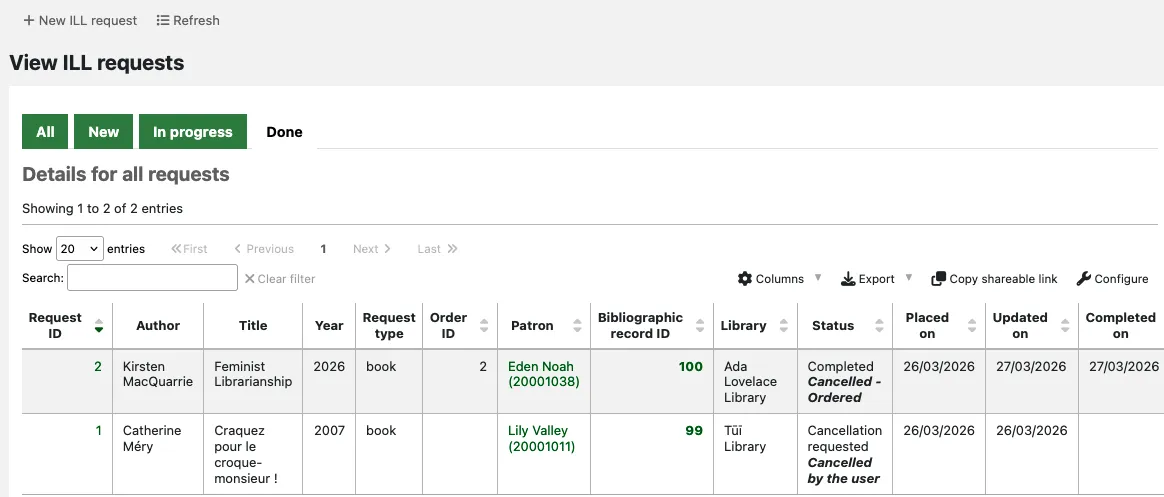
This system preference allows you to organise ILL requests into custom tabs on the main ILL requests screen.
The tabs are based on the main status (not the status alias) of each ILL request. For each tab, specify a tab name and which status codes should be sorted in it.
Use the list of request statuses to find the relevant status codes.
例子:
- name: New
status:
   - NEW
- name: In progress
status:
   - REQ
   - GENREQ
   - REQREV
- name: Done
status:
   - COMP
   - CANCREQ
   - CHK
   - RET
The new requests will appear in the 'New' tab. Requests with the status Requested, Requested from partners or Request reverted will appear in the 'In progress' tab. Requests with the status Completed, Cancellation requested, Checked out or Returned to library will be sorted into the 'Done' tab.
通知
ILLDefaultStaffEmail
詢問: 在沒有圖書館地址的情況下,用於向館員發送館際互借通知的備用電子郵件地址: ___。
描述:
預設情況下,館際互借請求郵件的回覆將發送到 圖書館的 館際互借館員郵箱地址。如果圖書館的館際互借館員郵箱地址欄位為空,則將使用此處輸入的地址。
ILLSendStaffNotices
詢問: 請在適當的時候將這些館際互借通知發送給館員: ___
描述:
您可以設定應向館員發送哪些館際互借通知。更多詳情請參閱 館際互借電子郵件通知 部分。
請輸入要傳送的通知的 字母代碼,以垂直線 (|) 分隔。例如:
ILL_REQUEST_CANCEL|ILL_REQUEST_MODIFIED
如果此系統偏好留空,則不會發送任何館員間的館際互借通知。
OPAC
ILLOpacbackends
詢問: 已啟用 OPAC 發起請求的館際互借後端: ___。
描述:
此偏好設定控制哪些館際互借後端請求表單可用於 OPAC 請求。
輸入後端代碼,以垂直線 (|) 分隔。例如:
FreeForm|BLDSS
請參考後端設定指南,以了解此處應輸入的正確術語。
If this system preference is left empty, all installed backends will be enabled for OPAC requests.
ILLOpacUnauthenticatedRequest
版本
This feature was first introduced in version 25.05 of Koha.
Asks: ___ OPAC users to place ILL requests without having to be logged in.
值:
Don't allow
Allow
Default: Don't allow
描述:
This system preference controls whether patrons can place interlibrary loan requests in the OPAC when they are not logged in.
When this preference is set to 'Allow', patrons who do not yet have a library account or those who have forgotten their login details can still place ILL requests.
This is especially useful when patrons are redirected from another catalogue or website to place an ILL request in your OPAC. It allows them to place their request straightaway, without worrying about whether they are already a library member or not.
When an unauthenticated ILL request is created, it has the status 'Unauthenticated'. Library staff will be able to link it to a new or existing patron account when managing the request; the status then changes to 'New request'.
工作流程
AutoILLBackendPriority
版本
This feature was first introduced in version 25.05 of Koha.
Asks: Select which backends will be queried for availability and in what order of priority. The first available backend will be suggested to place the request with.
描述:
This system preference enables you to check which provider(s) would be able to supply the requested title, before deciding which one you want to place the request with.
To be able to use this feature, you need to have at least one additional backend installed (any backend other than Standard).
If no backend is selected in this system preference, the feature will be disabled.
If you have more than one additional backend installed, you can drag and drop the labels to place the backends in your preferred order of priority.

If you are using this feature (you have selected at least one backend in this system preference), patrons will not be prompted to select a provider when placing an interlibrary loan request in the OPAC. Instead, Koha will check the backends for availability in the background and automatically assign one to the request.
Unless you have enabled the ILLModuleUnmediated system preference, the created requested has the status 'New request' and requires staff to progress it.
If you are using this feature, you will not see an option to initially select a backend when clicking 'New ILL request' in the staff interface. Instead, when clicking 'Create' after entering the request metadata, you will see the 'Confirm request' page where the availability check occurs. Using the information displayed, you can decide which provider to send the request to.
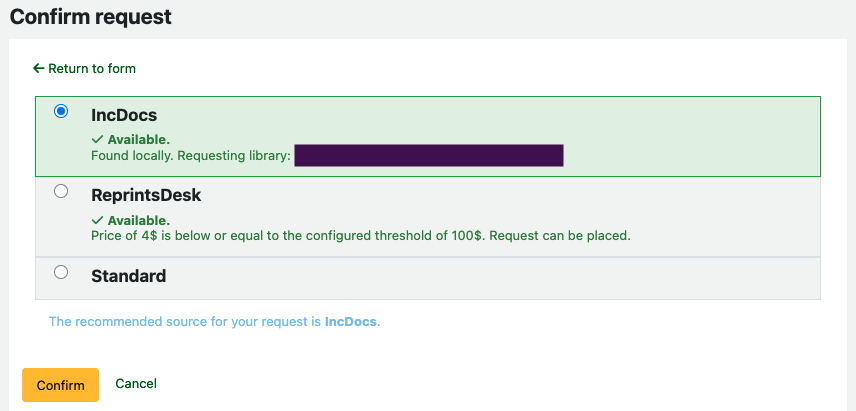
Because the backend selection is done after the request metadata is provided, the form from the Standard backend is used to enter the details of the requested title.
ILLCheckAvailability
詢問: ___ 在請求過程中外部資源的可用性。
預設值: 不勾選
值:
不要檢查
檢查
描述:
此設定控制是否在提交請求前搜尋特定的外部資源。可用的資源透過 外掛 安裝。這些外掛程式可在 Koha 外掛維基頁面 https://wiki.koha-community.org/wiki/Koha_plugins 找到。目前已有 EDS (EBSCO Discovery Service)、Z39.50 和 Unpaywall 的外掛。當讀者 提交館際互借請求 時,表單中的條目元資料將用於搜尋外部資源。讀者隨後可以點擊搜尋結果中的標題連結。如果找到所需條目,則可以放棄請求。否則,讀者可以繼續按正常流程完成請求。
ILLModuleDisclaimerByType
詢問: 如果館際互借後端支持,新增 YAML 將啟用請求建立中的請求類型免責聲明階段,提示使用者輸入已定義的請求類型特定免責聲明 (館員介面和 OPAC)。
描述:
此系統偏好設定用於針對不同類型的請求提供不同的免責聲明。
每種請求類型都有 3 個設定選項:
text: 指定請求類型可見的 HTML.av_category_code: 將在免責聲明階段顯示的選項所使用的容許值類別.bypass: 允許特定類型的請求跳過免責聲明階段.
例子:
all:
 text: |
  <h2>HTML title</h2>
  <p>This is an HTML paragraph</p>
  <p>This is another HTML paragraph</p>
 av_category_code: YES_NO
article:
 text: copyright text for all article type requests
 av_category_code: YES_NO
 bypass: 1
範例將顯示第一個文字 ("HTML 標題等"),除文章請求外,所有請求都將提供是/否選項,文章請求將跳過免責聲明步驟.
Note
並非所有後端都支援此功能.
Warning
此系統設定需要 YAML 語法才能正常運作.
這表示
請確認設定名稱和冒號之間沒有空格
請確認冒號和值之間有一個空格
確認每個設定都單獨佔一行