बढ़ी हुई सामग्री
Get there: More > Administration > System preferences > Enhanced content
महत्वपूर्ण
हमेशा बाह्य डेटा स्रोतों के साथ जुड़े सेवा की शर्तें सुनिश्चित करें कि आप की अनुमति दी सीमा के भीतर उत्पादों का उपयोग कर रहे हैं होने के लिए पढ़ें.
टिप्पणी
आप (स्थानीय कवर छवियों सहित) की स्थापना कवर छवियों के लिए एक से अधिक सेवा नहीं हो सकता. आप एक से अधिक की स्थापना की तो आप कई कवर छवियों मिल जाएगा. इसके बजाय कवर छवियों के लिए केवल एक ही स्रोत चुनें.
सब
FRBRizeEditions
Asks: ___ other editions of an item on the staff interface (if found by one of the services below).
मानः
नहीं दिखाएँ
दिखाना
डिफ़ॉल्ट: नहीं दिखाएं
विवरण:
Using the rules set forth in the Functional Requirements for Bibliographic records, this option, when enabled, pulls all editions of the same title available in your collection regardless of material type. Items will appear under an 'Editions' tab on the detail page for the title in question. According to Libraries Unlimited's Online Dictionary for Library and Information Science (https://odlis.abc-clio.com/), FRBRizing the catalog involves collating MARC records of similar materials. FRBRization brings together entities (sets of Works, Expressions, or Manifestations), rather than just sets of Items. It can aid patrons in selecting related items, expressions, and manifestations that will serve their needs. When it is set to "Show", the OPAC will query one or more ISBN web services for associated ISBNs and display an Editions tab on the details pages. Once this preference is enabled, the library must select one of the ISBN options (such as ThingISBN). This option is only for the Staff Client - the OPACFRBRizeEditions option must be enabled to have the Editions tab appear on the OPAC.

टिप्पणी
यह आवश्यक है कि आप एक या अधिक आईएसबीएन सेवाओं को चालू करें (जैसे कि ThingISBN).
OPACFRBRizeEditions
पूछता है: ___ ओपेक पर किसी आइटम के अन्य संस्करण.
मानः
नहीं दिखाएँ
दिखाना
डिफ़ॉल्ट: नहीं दिखाएं
विवरण:
Using the rules set forth in the Functional Requirements for Bibliographic records, this option, when enabled, pulls all editions of the same title available in your collection regardless of material type. Items will appear under an 'Editions' tab on the detail page for the title in question.. According to Libraries Unlimited's Online Dictionary for Library and Information Science (https://odlis.abc-clio.com/), FRBRizing the catalog involves collating MARC records of similar materials. FRBRization brings together entities (sets of Works, Expressions, or Manifestations), rather than just sets of Items. It can aid patrons in selecting related items, expressions, and manifestations that will serve their needs. When it is set to "Show", the OPAC will query one or more ISBN web services for associated ISBNs and display an Editions tab on the details pages. Once this preference is enabled, the library must select one of the ISBN options (such as ThingISBN). This option is only for the OPAC - the FRBRizeEditions option must be turned "On" to have the Editions tab appear on the Staff Client.
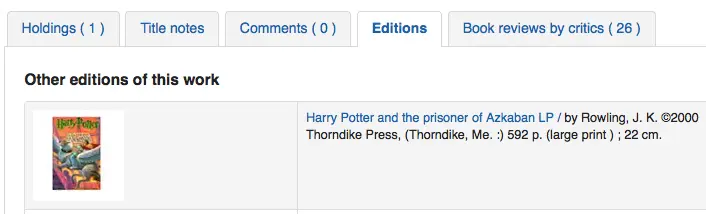
यह वरीयता सामग्री के प्रकार की परवाह किए बिना अपने संग्रह में ही उपलब्ध शीर्षक के सभी संस्करणों खींचती है. आइटम प्रश्न में खिताब के लिए विस्तार पृष्ठ पर एक 'संस्करण' टैब के अंतर्गत दिखाई देगा.
टिप्पणी
यह आवश्यक है कि आप एक या अधिक आईएसबीएन सेवाओं को चालू करें (जैसे कि ThingISBN).
अमेजन
AmazonAssocTag
पूछता है: अमेज़ॅन के लिंक पर सहयोगी टैग ___डाल दें.
टिप्पणी
यह अपने पुस्तकालय रेफरल फीस शुद्ध कर सकते हैं अगर एक संरक्षक अपनी साइट से अमेज़न के माध्यम से क्लिक करने के बाद एक आइटम खरीदने का फैसला किया.
विवरण:
An Amazon Associates Tag allows a library to earn a percentage of all purchases made on Amazon when a patron accesses Amazon's site via links on the library's website. More information about the Amazon Associates program is available at Amazon's Affiliate Program's website, https://affiliate-program.amazon.com/. Before a tag can be obtained, however, the library must first apply for an Amazon Web Services (AWS) account. Applications are free of charge and can be made at https://aws.amazon.com. Once an AWS account has been established, the library can then obtain the Amazon Associates Tag.
साइन अप करें: https://affiliate-program.amazon.com/
AmazonCoverImages
पूछता है: ___ खोज परिणामों पर अमेज़ॅन से छवियों को कवर करें और स्टाफ इंटरफ़ेस पर आइटम विवरण पृष्ठों पर जाएं.
मानः
नहीं दिखाएँ
दिखाना
डिफ़ॉल्ट: नहीं दिखाएं
विवरण:
This system preference makes it possible to either allow or prevent Amazon cover images from being displayed in the Staff Client. Cover images are retrieved by Amazon, which pulls the content based on the first ISBN in the item's MARC record. Amazon offers this service free of charge. If the value for this preference is set to "Show", the cover images will appear in the Staff Client, and if it is set to "Don't show", the images will not appear. Finally, if you're using Amazon cover images, all other cover image services must be disabled. If they are not disabled, they will prevent AmazonCoverImages from functioning properly.
AmazonLocale
पूछता है: अमेज़ॅन डेटा का उपयोग अपनी ___ वेबसाइट से करें।
मानः
अमेरिकी
ब्रिटिश
कनाडावासी
फ्रेंच
जर्मन
भारतीय
जापानी
डिफ़ॉल्ट: अमेरिकी
OPACAmazonCoverImages
पूछता है: ___ ओपेक पर खोज परिणामों और आइटम विवरण पृष्ठों पर अमेज़ॅन से चित्रों को कवर करें.
मानः
नहीं दिखाएँ
दिखाना
डिफ़ॉल्ट: नहीं दिखाएं
विवरण:
This system preference makes it possible to either allow or prevent Amazon cover images from being displayed in the OPAC. Cover images are retrieved by Amazon, which pulls the content based on the first ISBN in the item's MARC record. Amazon offers this service free of charge. If the value for this preference is set to "Show", the cover images will appear in the OPAC, and if it is set to "Don't show", the images will not appear. Finally, if you're using Amazon cover images, all other cover image services must be disabled. If they are not disabled, they will prevent AmazonCoverImages from functioning properly.
Babelthèque
Babelthèque
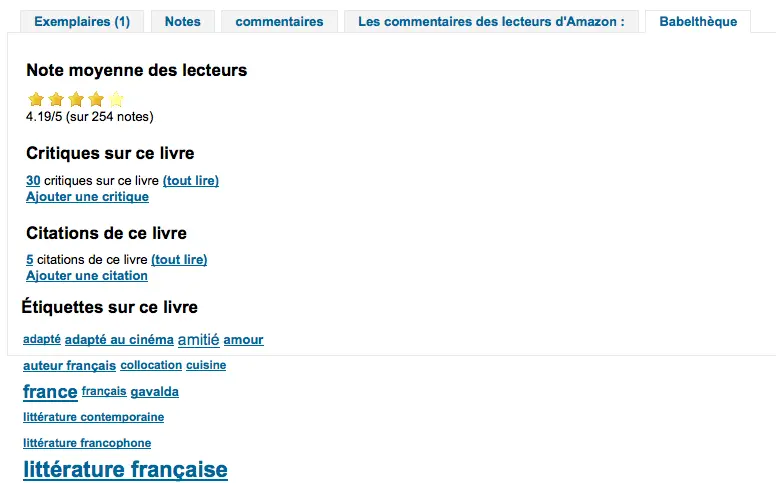
पूछता है:___ ओपेक पर आइटम विवरण पृष्ठों में Babelthèque से जानकारी (जैसे समीक्षा और उद्धरण) शामिल करें.
मानः
करें
नही करना
डिफ़ॉल्ट: नही करेें
विवरण:
This preference makes it possible to display a Babelthèque tab in the OPAC, allowing patrons to access tags, reviews, and additional title information provided by Babelthèque. The information which Babelthèque supplies is drawn from the French language-based Babelio, a French service similar to LibraryThing for Libraries. For more information, visit Babelthèque's website. Libraries that wish to allow access to this information must first register for the service. Please note that this information is only provided in French.
Babeltheque_url_js
Asks: Use this URL for the Babelthèque javascript file: ___ (e.g. http://www.babeltheque.com/bw_XX.js)
Babeltheque_url_update
Asks: Use this URL for the Babelthèque periodic update: ___ (e.g. http://www.babeltheque.com/.../file.csv.bz2).
बेकर और टेलर
सावधानी
Baker and Taylor closed in 2025. These preferences have been removed from Koha as of version 26.05.
BakerTaylorBookstoreURL
पूछता है: बेकर और टेलर "माई लाइब्रेरी बुकस्टोर" लिंक पर पहुंचा जाना चाहिए https:// ___ isbn
Default: [Empty]
विवरण:
Some libraries generate additional funding for the library by selling books and other materials that are purchased from or have been previously leased from Baker & Taylor. These materials can be accessed via a link on the library's website. This service is often referred to as "My Library Bookstore." In order to participate in this program, the library must first register and pay for the service with Baker & Taylor. Additional information about this and other services provided by Baker & Taylor is available at the Baker & Taylor website. The BakerTaylorBookstoreURL preference establishes the URL in order to link to the library's Baker & Taylor-backed online bookstore, if such a bookstore has been established. The default for this field is left blank; if no value is entered, the links to My Library Bookstore will remain inactive. If enabling this preference, enter the library's Hostname and Parent Number in the appropriate location within the URL. The "key" value (key=) should be appended to the URL, and https:// should be prepended.
टिप्पणी
यह खाली इन कड़ियों को निष्क्रिय करने के लिए छोड़ दें.
टिप्पणी
सब्सक्राइब करते समय बेकर और टेलर से यह जानकारी प्राप्त करना सुनिश्चित करें।
BakerTaylorEnabled
पूछता है: ___ बेकर और टेलर ओपेक और स्टाफ क्लाइंट को लिंक और कवर छवियां। इसके लिए आवश्यक है कि आपने उपयोगकर्ता नाम और पासवर्ड दर्ज किया हो (जिसे छवि लिंक में देखा जा सकता है).
मानः
जोड़ना
जोड़ें नहीं
डिफ़ॉल्ट: जोड़े नही
विवरण:
This preference makes it possible to display Baker & Taylor content (book reviews, descriptions, cover images, etc.) in both the Staff Client and the OPAC. Libraries that wish to display Baker & Taylor content must first register and pay for this service with Baker & Taylor. If Baker & Taylor content is enabled be sure to turn off other cover and review services to prevent interference.
टिप्पणी
To use this you will need to also set the BakerTaylorUsername and BakerTaylorPassword system preferences
बेकरटायलर उपयोगकर्ता नाम और बेकर टेलर पासवर्ड
पूछता है: प्उपयोगकर्ता नाम का उपयोग कर बेकर और टेलर तक पहुंचें ___ और पासवर्ड ___
Default: [Empty]
विवरण:
This setting in only applicable if the library has a paid subscription to the external Content Café service from Baker & Taylor. Use the box provided to enter in the library's Content Café username and password. Also, ensure that the BakerTaylorBookstoreURL and BakerTaylorEnabled settings are properly set. The Content Café service is a feed of enhanced content such as cover art, professional reviews, and summaries that is displayed along with Staff Client/OPAC search results. For more information on this service please see the Baker & Taylor website.
टिप्पणी
सब्सक्राइब करते समय बेकर और टेलर से यह जानकारी प्राप्त करना सुनिश्चित करें।
कोस कवर छवियों कैश
Coce एक दूरस्थ छवि यूआरएल कैश है. इस विकल्प के साथ, कवर छवियों इतने पर अमेज़न, गूगल से सीधे कौड़ी नहीं कर रहे हैं, और. उनके यूआरएल Coce करने के लिए एक वेब सेवा है जो यूआरएल की एक कैश का प्रबंधन के माध्यम से अनुरोध कर रहे हैं.
Coce कई लाभ है जब यह चुनने और Koha में कवर छवियों को प्रदर्शित करने के लिए आता है:
If a book cover is not available from a provider, but is available from another one, Koha will be able to display a book cover, which isn't the case if you don't set Coce up.
Since URLs are cached, it isn't necessary for each book cover to be requested again.
अमेज़न पुस्तक कवर अमेज़न उत्पाद विज्ञापन एपीआई, जिसका अर्थ है कि अधिक कवर (ISBN13) प्राप्त कर रहे हैं के साथ प्राप्त कर रहे हैं.
टिप्पणी
Coce does not come bundled with Koha. Your Koha install will not already have a Coce server set up. Before enabling this functionality you will want to be sure to have a Coce server set up. Instructions on installing and setting up Coce can be found on the official github page at https://github.com/fredericd/coce.
IntranetCoce
Asks: ___ a Coce image cache service in the staff interface.
मानः
सक्षम न करें
सक्षम करें
डिफ़ॉल्ट: सक्षम न करें
विवरण:
Setting this system preference to 'Enable' allows you to fetch cover images from different providers for display of your catalog in the staff interface.
OpacCoce
Asks: ___ a Coce image cache service in the OPAC.
मानः
सक्षम न करें
सक्षम करें
डिफ़ॉल्ट: सक्षम न करें
विवरण:
Setting this system preference to 'Enable' allows you to fetch cover images from different providers for display of your catalog in the OPAC.
CoceHost
पूछता है: Coce सर्वर URL ___
Default: [Empty]
विवरण:
यह आपके कोसे सर्वर पर पूरा यूआरएल (से शुरू होगा http://) होगा.
CoceProviders
पूछता है: कवर लाने के लिए निम्नलिखित प्रदाताओं का उपयोग करें ___
मानः
[सबको चुनें]
अमेज़ॅन वेब सेवा
गूगल बुक्स
ओपन लाइब्रेरी
Default: [Empty]
विवरण:
प्रदाताओं यहाँ चुना अपने Koha सूची में प्रदर्शन के लिए कवर छवियों को इकट्ठा करने के लिए इस्तेमाल किया जाएगा.
गूगल
GoogleJackets
पूछता है: ___ ओपेक पर परिणामों और आइटम विवरण पृष्ठों को खोजने के लिए Google पुस्तकें से चित्रों को कवर करें.
मानः
जोड़ना
जोड़ें नहीं
डिफ़ॉल्ट: जोड़े नही
विवरण:
यह सेटिंग मुक्त गूगल बुक्स डेटाबेस से लागू कवर कला के प्रदर्शन को नियंत्रित करता है, गूगल बुक्स एपीआई के माध्यम से. कृपया ध्यान दें कि इस सुविधा का उपयोग करने के लिए अन्य सभी कवर सेवाओं को बंद कर दिया जाना चाहिए.
एचटीएमएल 5 मीडिया
HTML5MediaEnabled
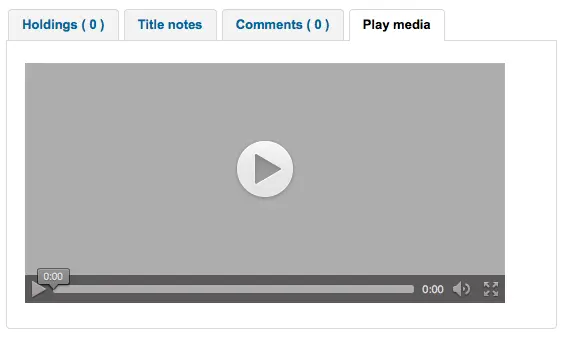
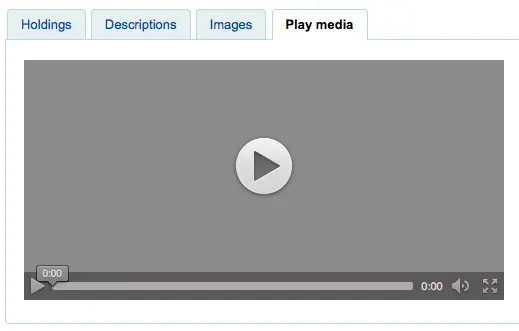
Asks: Show a tab with a HTML5 media player for files cataloged in field 856 ___
मानः
ओपेक और स्टाफ क्लाइंट में
ओपेक में
स्टाफ क्लाइंट में
बिल्कुल नहीं
डिफ़ॉल्ट: बिल्कुल नहीं
विवरण:
यदि आप अपने मार्क रिकॉर्ड इस वरीयता चलाने / एचटीएमएल 5 का उपयोग कर एक अलग टैब में उन मीडिया फ़ाइलों को दिखा सकते हैं की 856 में मीडिया तत्वों है.
HTML5MediaExtensions
पूछता है: मीडिया फाइल एक्सटेंशन ___
डिफ़ॉल्ट: webm|ogg|ogv|oga|vtt
विवरण:
बार के साथ अलग फ़ाइल एक्सटेंशन में दर्ज करें (|)
HTML5MediaYouTube
पूछते हैं:___ वीडियो के रूप में यूट्यूब लिंक.
मानः
एम्बेड न करें
एम्बेड
डिफ़ॉल्ट: एम्बेड न करें
टिप्पणी
पहले सक्षम करने के लिए इसे चालू करने के लिए HTML5MediaEnabled
विवरण:
यह वरीयता मार्क21 856$u को अनुमति देगी जो YouTube को इंगित किए गए पृष्ठों पर एक खेलने योग्य वीडियो के रूप में दिखाई देती है HTML5MediaEnabled.
LibraryThing
LibraryThing for Libraries is a pay service. You must first contact LibraryThing directly for pricing and subscription information. Learn more at https://www.librarything.com/forlibraries/. Also, for further configuration instructions please see the LibraryThing Wiki: https://wiki.librarything.com/index.php/Koha
LibraryThingForLibrariesEnabled
पूछता है: ___समीक्षा, इसी तरह की वस्तुओं, और लाइब्रेरी थिंग से लाइब्रेरी के लिए ओपेक पर आइटम विवरण पृष्ठों पर टैग.
मानः
नहीं दिखाएँ
दिखाना
डिफ़ॉल्ट: नहीं दिखाएं
विवरण:
यदि पुस्तकालय पुस्तकालय सेवा के लिए बाहरी LibraryThing करने के लिए एक भुगतान किया सदस्यता है यह सेटिंग केवल लागू है. यह सेवा इस तरह के पुस्तक सिफारिशों के रूप में सूची आइटम पर विस्तार जानकारी के प्रदर्शन के साथ संरक्षक प्रदान कर सकते हैं. यह भी टैग किए गए ब्राउज़िंग, संरक्षक लिखा समीक्षा, और एक आभासी पुस्तकालय विवरण टैब से पहुँचा प्रदर्शन की तरह उन्नत सुविधाओं की पेशकश कर सकते हैं.
टिप्पणी
If this is set to 'show' you will need to enter a value in the LibraryThingForLibrariesID system preference.
LibraryThingForLibrariesID
पूछता है: ग्राहक आईडी का उपयोग कर पुस्तकालयों के लिए एक्सेस लाइब्रेरी चीज ___
Default: [Empty]
विवरण:
यह सेटिंग केवल तभी लागू होती है अगर लाइब्रेरी पुस्तकालय सेवा के लिए बाहरी लाइब्रेरी थिंग के लिए सशुल्क सदस्यता होती है. पुस्तकालय में लाइब्रेरी थिंग द्वारा प्रदान किए गए अनुसार लाइब्रेरी आईडी के लिए लाइब्रेरी की लाइब्रेरीशिप में प्रवेश करने के लिए दिए गए बॉक्स का उपयोग करें. आईआईडी नंबर संख्या ###-######### में नंबर की एक श्रृंखला है, और लाइब्रेरीज़ के लिए लाइब्रेरी थिंग पर पुस्तकालय के खाता पेज पर पाया जा सकता है. यह सेवा, सूची सुझावों जैसे कि पुस्तक अनुशंसाएं और कवर आर्ट पर विस्तारित जानकारी के प्रदर्शन के साथ संरक्षक प्रदान कर सकती है. यह उन्नत विशेषताओं की पेशकश कर सकता है जैसे टैग की गईं ब्राउज़िंग, संरक्षक लिखित समीक्षाएं, और वर्चुअल लाइब्रेरी डिस्प्ले जो कि विवरण टैब से पहुंचा है.
LibraryThingForLibrariesTabbedView
पूछताछ: लाइब्रेरी सामग्री के लिए लाइब्रेरी थिंग दिखाएँ ___
मानः
ग्रंथ सूची के साथ लाइन में
टैब में
डिफ़ॉल्ट: ग्रंथ सूची के साथ लाइन में
विवरण:
यह सेटिंग केवल तभी लागू होती है अगर लायब्रेरी पुस्तकालय सेवा के लिए बाहरी लाइब्रेरी टायिंग के लिए सशुल्क सदस्यता होती है. यह सेवा, सूची सुझावों जैसे कि पुस्तक अनुशंसाएं और कवर आर्ट पर विस्तारित जानकारी के प्रदर्शन के साथ संरक्षक प्रदान कर सकती है. यह उन्नत विशेषताओं की पेशकश कर सकता है जैसे टैग की गईं ब्राउज़िंग, संरक्षक लिखित समीक्षाएं, और वर्चुअल लाइब्रेरी डिस्प्ले जो कि विवरण टैब से पहुंचा है.
ThingISBN
पूछता है: ___एक शीर्षक के अन्य संस्करण दिखाने के लिए ThingISBN सेवा
मानः
उपयोग नहीं करें
उपयोग
डिफ़ॉल्ट: प्रयोग नही करें
विवरण:
आइटम के विवरण पृष्ठ पर एक "संस्करण" टैब प्रदर्शित करने के लिए 'उपयोग' पर सेट करें. एडिशन सूचीबद्ध हैं, कवर आर्ट के साथ पूर्ण (यदि आपके पास कवर सेवाओं को सक्षम है) और ग्रंथ सूची संबंधी जानकारी. फ़ीड लाइब्रेरीथींग की थिंगआईएसबीएन वेब सेवा से आता है. यह प्रति दिन 1,000 से कम अनुरोध वाले गैर-वाणिज्यिक साइटों के लिए एक नि:शुल्क सेवा है.
टिप्पणी
आवश्यक है FRBRizeEditions और/या OPACFRBRizeEditions 'शो' पर सेट करें
टिप्पणी
यह लाइब्रेरी थिंग से पुस्तकालयों के लिए अलग है और इसमें इसके साथ जुड़ी कोई लागत नहीं है.
स्थानीय या दूरस्थ कवर छवियां
AllowMultipleCovers
पूछता है: ___ प्रत्येक ग्रंथ सूची रिकार्ड तथा आइटम के साथ संलग्न होने वाली कई छवियां.
मानः
अनुमति दें
अनुमति नहीं देना
डिफ़ॉल्ट: की अनुमति न दें
विवरण:
यदि यह वरीयता 'अनुमति' पर सेट है, तो आप कई छवियों को अपलोड कर सकते हैं जो ओपीएसी और स्टाफ इंटरफ़ेस में ग्रंथ सूची रिकॉर्ड के चित्र टैब में दिखाई देंगे।
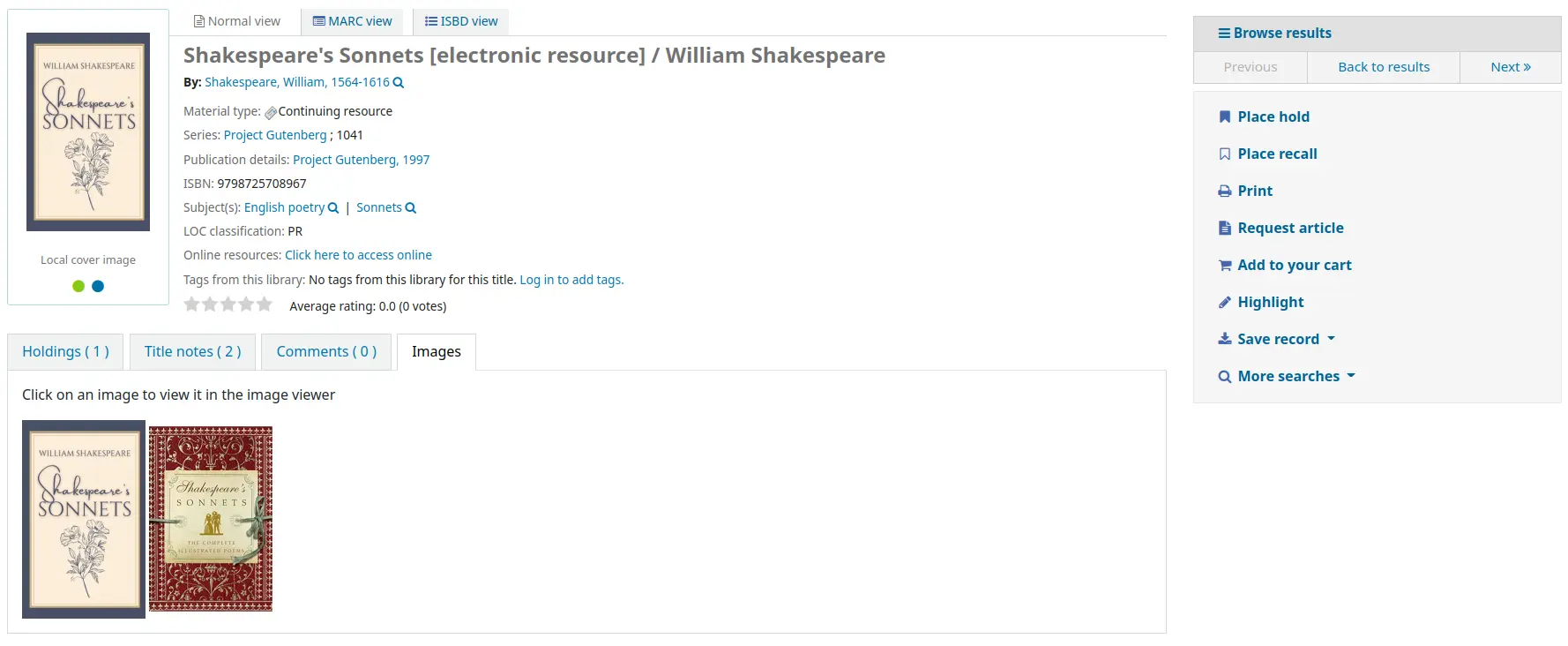
इस प्रणाली वरीयता के लिए आवश्यक है कि या तो एक या दोनों LocalCoverImages और OPACLocalCoverImages शो' पर सेट हो।
CustomCoverImages
पूछता है: ___ स्टाफ इंटरफ़ेस में कस्टम रिमोट URL छवियां।
मानः
नहीं दिखाएँ
दिखाना
डिफ़ॉल्ट: नहीं दिखाएं
विवरण:
यदि आप का उपयोग करते हैं CustomCoverImagesURL, यह वरीयता इंगित करती है कि आप इन कवर छवियों को स्टाफ इंटरफ़ेस में दिखाना चाहते हैं।
Use OPACCustomCoverImages if you want those images to appear in the OPAC.
OPACCustomCoverImages
पूछता है: ___ओपेक में कस्टम रिमोट यूआरएल चित्र.
मानः
नहीं दिखाएँ
दिखाना
डिफ़ॉल्ट: नहीं दिखाएं
विवरण:
यदि आप का उपयोग करते हैं CustomCoverImagesURL, यह वरीयता इंगित करती है कि क्या आप चाहते हैं कि ये कवर चित्र औपेक में दिखाई दें।
Use CustomCoverImages if you want those images to appear in the staff interface.
CustomCoverImagesURL
पूछता है: निम्न URL का उपयोग करना: ___
Default: [Empty]
विवरण:
आप URL में ग्रंथ सूची की जानकारी को प्रतिस्थापित करने के लिए कोड का उपयोग कर सकते हैं: {isbn}, {issn}, {normalized_isbn}
उदारण के लिए: http://www.mylibrarysite.com/covers/{isbn}.png
आप URL में मार्क फ़ील्ड्स और सबफील्ड्स का उपयोग भी कर सकते हैं: {024$a}
उदारण के लिए: http://www.mylibrarysite.com/covers/{024$a}.png
Make sure to enable CustomCoverImages if you want those images to appear in the staff interface and OPACCustomCoverImages if you want those images to appear in the OPAC.
LocalCoverImages
पूछता है: ___स्टाफ इंटरफ़ेस खोज और विवरण पृष्ठों पर स्थानीय कवर चित्र।
मानः
नहीं दिखाएँ
दिखाना
डिफ़ॉल्ट: नहीं दिखाएं
विवरण:
'शो' के लिए इस वरीयता को सेट करना आपको अपनी खुद की कवर छवियों को ग्रंथ सूची के रिकॉर्ड में अपलोड करने और उन्हें स्टाफ इंटरफ़ेस में विस्तार पृष्ठ पर प्रदर्शित करने की अनुमति देता है।
यह भी देखें:
OPACLocalCoverImages
पूछता है: ___ ओपेक खोज और विवरण पृष्ठों पर स्थानीय कवर छवियां.
मानः
नहीं दिखाएँ
दिखाना
डिफ़ॉल्ट: नहीं दिखाएं
विवरण:
'शो' के लिए इस वरीयता को सेट करना आपको अपनी खुद की कवर छवियों को ग्रंथ सूची के रिकॉर्ड में अपलोड करने और उन्हें विस्तार पृष्ठ पर प्रदर्शित करने और ओपेक में खोज परिणामों को प्रदर्शित करने की अनुमति देता है।
यह भी देखें:
मैनुअल
KohaManualBaseURL
पूछता है: ___ कोहा मैनुअल का स्थान
डिफ़ॉल्ट: https://koha-community.org/manual/
विवरण:
आप कोहा मैनुअल का उपयोग करने के लिए स्थान निर्दिष्ट कर सकते हैं। यह वह URL होता है, जिसका उपयोग पृष्ठ के ऊपरी दाएं कोने में 'मदद' पर क्लिक करने पर सहायता पृष्ठों के लिए किया जाएगा।
डिफ़ॉल्ट रूप से, कोहा मैनुअल का उपयोग किया जाता है, लेकिन आप अपने स्वयं के सहायता पृष्ठों के विकल्प के लिए इस सिस्टम वरीयता का उपयोग कर सकते हैं।
यदि URL '/' से शुरू होता है, तो of staffClientBaseURL का उपयोग उपसर्ग के रूप में किया जाएगा।
ध्यान दें कि यह संस्करण / भाषा / प्रारूप द्वारा प्रत्यय दिया जाएगा (/17.11/en/html)
KohaManualLanguage
पूछते हैं: ऑनलाइन मैनुअल की भाषा ___
डिफ़ॉल्ट: अंग्रेजी
विवरण:
डिफ़ॉल्ट रूप से, कोहा इंटरफ़ेस की भाषा को मैनुअल भाषा के रूप में उपयोग किया जाएगा। हालाँकि, यदि उस भाषा में मैनुअल का अनुवाद नहीं किया गया है, तो यह सिस्टम वरीयता फ़ॉलबैक भाषा को निर्दिष्ट करता है।
उपन्यासकार का चयन
उपन्यासकार चयन एक नि: शुल्क सेवा नहीं है। ओपेक में इस सामग्री को एम्बेड करने के लिए अपनी लॉग इन जानकारी प्राप्त करने के लिए अपने एब्स्को प्रतिनिधि से संपर्क करें।
टिप्पणी
- Novelist Select does not include cover images for the search results
and bibliographic detail pages. You can choose any other cover image service for this content or you can contract with Ebsco to get access to the Baker & Taylor Content Cafe for an added fee.
NovelistSelectEnabled
पूछता है: ___ओपेक के लिए उपन्यासकार चुनें सामग्री.
मानः
जोड़ना
जोड़ें नहीं
टिप्पणी
Enabling this requires that you have entered a user profile in the NovelistSelectProfile system preference and a password in the NovelistSelectPassword system preference.
डिफ़ॉल्ट: जोड़े नही
विवरण:
एब्स्को से उपन्यासकार का चयन एक सदस्यता सेवा है कि ओपेक में अतिरिक्त सामग्री प्रदान कर सकता है.
NovelistSelectPassword
Asks: Access Novelist Select using password ___.
चेतावनी
This information will be visible if someone views the source code on your OPAC.
Default: [Empty]
विवरण:
एब्स्को से उपन्यासकार का चयन एक सदस्यता सेवा है कि ओपेक में अतिरिक्त सामग्री प्रदान कर सकता है.
NovelistSelectProfile
Asks: Access Novelist Select using user profile ___ on the OPAC.
चेतावनी
This information will be visible if someone views the source code on your OPAC.
Default: [Empty]
विवरण:
एब्स्को से उपन्यासकार का चयन एक सदस्यता सेवा है कि ओपेक में अतिरिक्त सामग्री प्रदान कर सकता है.
NovelistSelectStaffEnabled
Asks: ___ Novelist Select content to the staff interface (requires that you have entered in a user profile and password, which can be seen in image links).
मानः
जोड़ें नहीं
जोड़ना
डिफ़ॉल्ट: जोड़े नही
NovelistSelectStaffProfile
Asks: Access Novelist Select using user profile ___ on the staff interface.
Default: [Empty]
विवरण:
Without this value being set, Novelist features will be disabled on the staff interface until a correct profile is obtained from Novelist and entered into the field.
टिप्पणी
यह मान नोवेलिस्ट के लिए ओपेक प्रोफ़ाइल से स्वतंत्र रूप से सेट किया जाना चाहिए
NovelistSelectStaffView
Asks: Display Novelist Select staff interface content ___.
मानः
होल्डिंग टेबल से ऊपर
होल्डिंग टेबल के नीचे
एक टैब में
डिफ़ॉल्ट: एक टैब में
NovelistSelectView
पूछता है: उपन्यासकार सामग्री का चयन करें ___
मानः
होल्डिंग टेबल से ऊपर
होल्डिंग टेबल के नीचे
एक ओपेक टैब में
रिकॉर्ड ड्रॉपडाउन के तहत दायीं तरफ सहेजें
डिफ़ॉल्ट: एक ओपेक टैब में
विवरण:
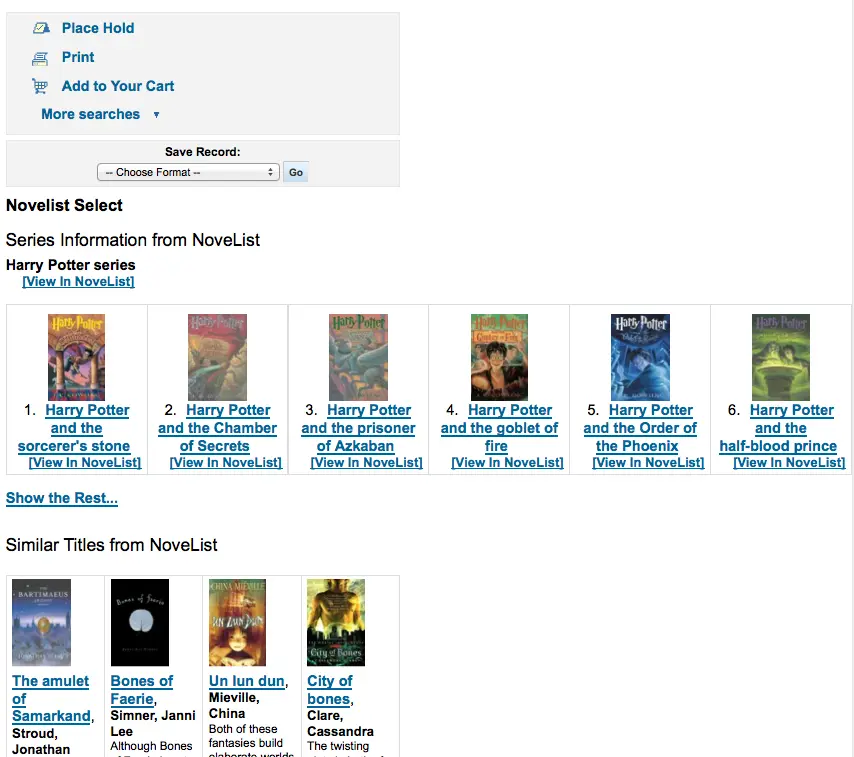
उपन्यासकार का चयन करें, सामग्री का एक बहुत प्रदान करता है कि कारण के लिए आप जहां इस सामग्री को प्रदर्शित करने के लिए चार विकल्प हैं. डिफ़ॉल्ट दृश्य जोत तालिका में एक टैब में है.
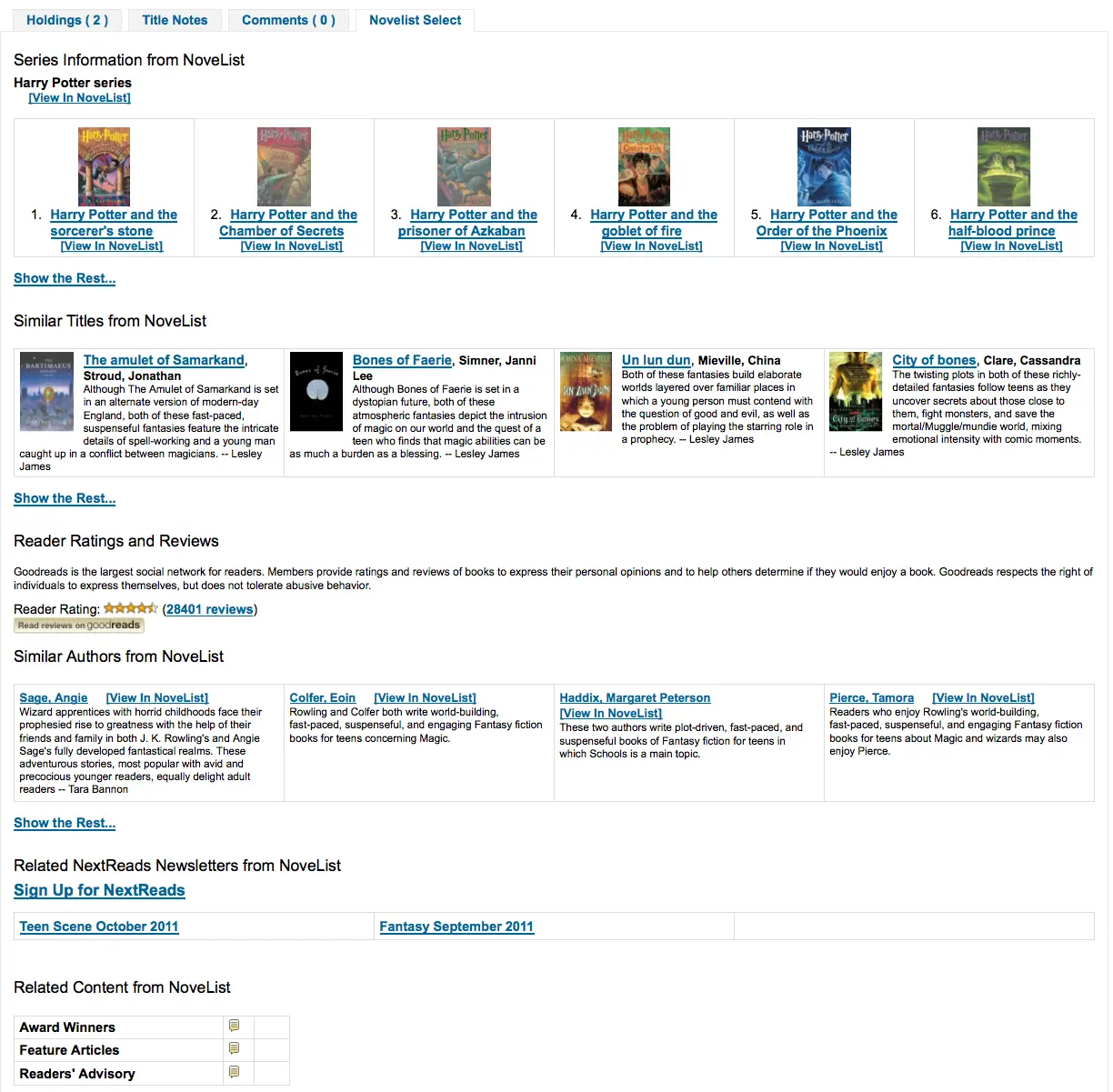
सामग्री समान है अगर आप इसे होल्डिंग टेबल के ऊपर या उसके नीचे दिखाने के लिए चुनते हैं यदि पृष्ठ के दाएं कॉलम में दिखाया गया है, तो यह एक ही सामग्री है, लेकिन स्थान सीमित होने के बाद थोड़ा अलग प्रदर्शित करता है.
ओपन लाइब्रेरी
OpenLibraryCovers
पूछता है: ___ओपेक पर परिणाम और आइटम विवरण पृष्ठों को खोज करने के लिए ओपन लाइब्रेरी से कवर चित्र.
मानः
जोड़ना
जोड़ें नहीं
डिफ़ॉल्ट: जोड़े नही
विवरण:
यह सेटिंग मुक्त ओपन लाइब्रेरी डेटाबेस से लागू कवर कला के प्रदर्शन को नियंत्रित करता है, ओपन लाइब्रेरी एपीआई के माध्यम से. कृपया ध्यान दें कि इस सुविधा का उपयोग करने के लिए अन्य सभी कवर सेवाओं को बंद कर दिया जाना चाहिए.
OpenLibrarySearch
पूछता है: ओपेक पर खोज परिणामों पर ___ टैग दिखाएं.
मानः
नहीं दिखाएँ
दिखाना

डिफ़ॉल्ट: नहीं दिखाएं
Overdrive
OverDrive is a paid-for service. You must first contact OverDrive directly for pricing and subscription information. Using the system preferences below will integrate Overdrive results in your OPAC searches.
Additionally, you can use OverDriveCirculation to allow your patrons to manage their OverDrive checkouts from their Koha OPAC account.
Once your library has a subscription, you will need to request from OverDrive:
the OverDrive Authname for your subscription
OverDrive API Client key and Client secret
OverDrive Library ID
OverDrive Website ID
OPACOverDrive
Version
This feature was first introduced in version 24.11 of Koha.
Asks: ___ OverDrive integration in the OPAC.
मानः
सक्षम न करें
सक्षम करें
डिफ़ॉल्ट: सक्षम न करें
विवरण:
This system preference acts as the main switch for the OverDrive integration in the OPAC.
Before switching this preference to 'Enable', add your OverDriveAuthname, OverDriveLibraryID, OverDriveClientKey and OverDriveClientSecret.
OverDriveAuthname
Asks: Authenticate using OverDrive Authname ___ (will be used as fallback if individual branch authname not set in the OverDrive library authnames table).
विवरण:
If the library has only one OverDrive Authname, it should be entered in this system preference.
If the library has multiple branches with specific Authnames (e.g., in a consortium situation), they will need to use the click through to the OverDrive library authnames table to allocate the correct authname to each of them.
OverDriveCirculation and OverDriveUsername and OverDrivePasswordRequired
Asks: ___ users to access their OverDrive circulation history, and circulate items. Overdrive uses the patron's ___ for user access to OverDrive. A password is ___ for user access to OverDrive. If you enable access you must have a SIP connection registered with OverDrive for patron authentication against Koha.
Values for OverDriveCirculation:
Don’t enable
सक्षम करें
Values for OverDriveUsername:
card number
user name
Values for OverDrivePasswordRequired:
Not required
Required
Default: [Empty]
विवरण:
The OverDriveCirculation system preference tells Koha whether your users will have access to their Overdrive Circulation history and be able to circulate items. OverDriveUsername and OverDrivePasswordRequired control how users will log into OverDrive.
OverDriveClientKey और OverDriveClientSecret
Asks: Include OverDrive availability information with the client key ___ and client secret ___
Default: [Empty]
विवरण:
OverDrive customers can get this information by visiting the OverDrive Developer Portal and following the instructions found there to apply as an API developer. Once this data and the OverDriveLibraryID are populated you will see OverDrive results on your OPAC searches.
OverDriveLibraryID
पूछता है: लाइब्रेरी के ओवरड्राइव कैटलॉग से आइटम्स दिखाएँ # ___
Default: [Empty]
विवरण:
OverDrive customers can get this information by visiting the OverDrive Developer Portal and following the instructions found there to apply as an API developer. Once this data and the OverDriveClientKey and OverDriveClientSecret are populated you will see OverDrive results on your OPAC searches.
OverDriveWebsiteID
Asks: Authenticate using OverDrive website id # ___.
Default: [Empty]
विवरण:
This will indicate to Koha on which website ID to authenticate. This information is provided by OverDrive.
Syndetics
Proquest Syndetics is a paid service. Contact them for pricing and subscription information at https://proquest.syndetics.com/.
Displaying the enhanced content provided by Proquest Syndetics' services requires ISBNs in your MARC records.
SyndeticsAwards
पूछता है:___ सिंडिकेटिक्स से जानकारी पुरस्कारों के बारे में एक शीर्षक ओपेक पर आइटम विवरण पृष्ठों पर जीता है.
मानः
नहीं दिखाएँ
दिखाना
डिफ़ॉल्ट: नहीं दिखाएं
विवरण:
When this option is set to "Show", Proquest Syndetics provides its clients with a list of awards that any title has won. With this service enabled the library can display those awards for each book on its website. For each book or item that comes up during a user search, the list of awards for that title will be displayed. When a user clicks on a given award, information about that award is presented along with a list of the other titles that have won that award. If the user clicks on any title in the list, they will see holdings information about that title in their region. This option is a paid subscription service. The SyndeticsClientCode must be entered and the SyndeticsEnabled option must be activated before this service can be used.
SyndeticsClientCode
पूछता है: सिंडेटिक्स तक पहुंचने के लिए क्लाइंट कोड ___ का उपयोग करें
Default: [Empty]
विवरण:
Once the library signs up for Proquest Syndetics' services, they provide the library with an access code. (Visit the Proquest Syndetics website at https://proquest.syndetics.com/ for more information.) This is the code that must be entered to access Proquest Syndetics' subscription services. This is a paid subscription service. This value must be entered before SyndeticsEditions can be enabled. If the code is lost, corrupted, or forgotten, a new one can be obtained from Proquest Synetics.
टिप्पणी
आपको सिंडिकेटिक्स से सीधे अपने क्लाइंट कोड को प्राप्त करने की आवश्यकता होगी.
SyndeticsCoverImages और SyndeticsCoverImageSize
सिंडिकेटिक्स छवियाँ डिफ़ॉल्ट: नहीं दिखाएं
SyndeticsCoverImageSize डिफ़ॉल्ट: मध्यम
पूछता है: ___ ओपेक पर खोज परिणामों और आइटम विवरण पृष्ठों पर सिंडेटिक्स से चित्रों को कवर करें ___ साइज.
SyndeticsCoverImages मान:
नहीं दिखाएँ
दिखाना
SyndeticsCoverImageSize मान:
माध्यम
बड़ा
Default: [Empty]
विवरण:
When enabled, SyndeticsCoverImages, allows libraries to display Proquest Syndetics' collection of full-color cover images for books, videos, DVDs and CDs on their OPAC. For each book or item that comes up during a user search, the cover image for that title will be displayed. Since these cover images come in three sizes, the optimum size must be selected using the SyndeticsCoverImageSize preference after SyndeticsCoverImages are enabled. The cover images come in two sizes: mid-size (187 x 187 pixels), and large (400 x 400 pixels). Proquest Syndetics is a paid subscription service. The SyndeticsClientCode must be entered and the SyndeticsEnabled option must be activated before this service can be used. Other cover image preferences should also be disabled to avoid interference.
SyndeticsEditions
पूछता है: ___ओपेक पर आइटम विवरण पृष्ठों पर सिंडिकेटिक्स से एक शीर्षक के अन्य संस्करणों के बारे में जानकारी
मानः
नहीं दिखाएँ
दिखाना
टिप्पणी
- Requires OPACFRBRizeEditions set to
'show'
डिफ़ॉल्ट: नहीं दिखाएं
विवरण:
When enabled this option shows information on other editions of a title from Proquest Syndetics on the item detail pages of the OPAC. It is a paid subscription service. The SyndeticsClientCode must be entered and the SyndeticsEnabled option must be activated before this service can be used.
SyndeticsEnabled
पूछता है: सिंडिकेटिक्स से सामग्री ___.
मानः
उपयोग नहीं करें
उपयोग
डिफ़ॉल्ट: प्रयोग नही करें
विवरण:
When this option is enabled any of the Proquest Syndetics options can be used.
टिप्पणी
- Requires that you enter your
SyndeticsClientCode before this content will appear.
SyndeticsExcerpt
पूछता है: ___ ओपेक पर आइटम विवरण पृष्ठों पर सिंडेटिक्स से एक शीर्षक से उद्धरण.
मानः
नहीं दिखाएँ
दिखाना
डिफ़ॉल्ट: नहीं दिखाएं
विवरण:
This preference allows Proquest Syndetics to display excerpts given to them from selected publishers. The excerpts are available from prominently reviewed new titles, both fiction and non-fiction. The excerpts include poems, essays, recipes, forwards and prefaces.
SyndeticsReviews
पूछता है: ___ओपेक पर आइटम विवरण पृष्ठों पर सिंडिकेटिक्स से शीर्षक के समीक्षाएं.
मानः
नहीं दिखाएँ
दिखाना
डिफ़ॉल्ट: नहीं दिखाएं
विवरण:
Proquest Syndetics Reviews is an accumulation of book reviews available from a variety of journals and serials. The reviews page displays colored images of reviewed books dust jackets, partnered with the names of the journal or serial providing the review. Clicking on an icon opens a window revealing the book title, author's name, book cover icon and the critic's opinion of the book.
SyndeticsSeries
Asks: ___ information on other titles in a series from Syndetics on the record detail pages on the OPAC.
मानः
नहीं दिखाएँ
दिखाना
डिफ़ॉल्ट: नहीं दिखाएं
विवरण:
Each fiction title within a series is linked to the complete series record. The record displays each title in reading order and also displays the publication order, if different. Alternate series titles are also displayed.
SyndeticsSummary
पूछता है: ___ओपेक पर आइटम विवरण पृष्ठों पर सिंडिकेटिक्स से एक शीर्षक का सारांश.
मानः
नहीं दिखाएँ
दिखाना
डिफ़ॉल्ट: नहीं दिखाएं
विवरण:
Providing more than 5.6 million summaries and annotations derived from book jackets, edited publisher copy, or independently written annotations from Book News, Inc. Covering fiction and non-fiction, this summaries option provides annotations on both trade and scholarly titles.
SyndeticsTOC
पूछता है: ___ ओपेक पर आइटम विवरण पृष्ठों पर सिंडेटिक्स से एक शीर्षक की सामग्री की तालिका.
मानः
नहीं दिखाएँ
दिखाना
डिफ़ॉल्ट: नहीं दिखाएं
विवरण:
This system preference allows staff and patrons to review the Table of Contents from a wide variety of publications from popular self-help books to conference proceedings. Specific Information access is the main purpose for this option, allowing patrons guidance to their preferred section of the book. Special arrangements with selected book services are used to obtain the table of contents for new publications each year.
टेगिंग
TagsInputOnDetail
पूछता है:___ओपेक पर आइटम विवरण पृष्ठों पर इनपुट टैग के लिए संरक्षक.
मानः
अनुमति दें

अनुमति नहीं देना
डिफ़ॉल्ट: अनुमति दें
TagsInputOnList
पूछता है:___ओपेक पर खोज परिणामों पर इनपुट टैग के लिए संरक्षक.
मानः
अनुमति दें
अनुमति नहीं देना
डिफ़ॉल्ट: की अनुमति न दें
विवरण:
इस सिस्टम वरीयता का उपयोग यह नियंत्रित करने के लिए किया जाता है कि संरक्षक खोज परिणामों, सूचियों और कार्ट से शीर्षक में टैग जोड़ सकता है या नहीं।
जब 'अनुमति' पर सेट किया जाता है, तो दिन जोड़ने के लिए एक बटन, प्रत्येक खोज परिणामों के तहत दिखाई देता है, और प्रत्येक शीर्षक को एक सूची में और कार्ट में।
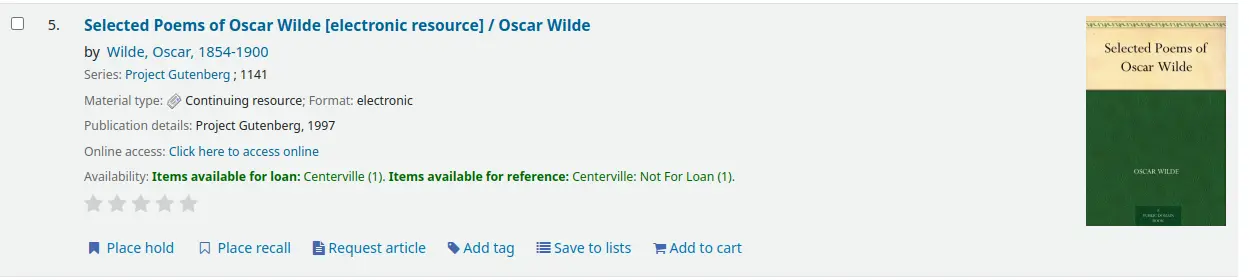
इसलिए संरक्षक चाहते हैं कि कई टाइटल का चयन करने और उन सभी को टैग करने की संभावना हो।