增強內容
到那裡: 更多 > 管理 > 系統偏好 > 強化內容
重要
注意外部資料來源的服務條款,確認在正確的授權範圍內使用它們。
Note
不能使用多個封面服務 (包括在地服務)。若設定多個服務將形成重複封面。只能選一個封面來源。
全部
FRBRizeEditions
Asks: ___ other editions of an item on the staff interface (if found by one of the services below).
值:
不顯示
展示
預設:不顯示
描述:
Using the rules set forth in the Functional Requirements for Bibliographic records, this option, when enabled, pulls all editions of the same title available in your collection regardless of material type. Items will appear under an 'Editions' tab on the detail page for the title in question. According to Libraries Unlimited's Online Dictionary for Library and Information Science (https://odlis.abc-clio.com/), FRBRizing the catalog involves collating MARC records of similar materials. FRBRization brings together entities (sets of Works, Expressions, or Manifestations), rather than just sets of Items. It can aid patrons in selecting related items, expressions, and manifestations that will serve their needs. When it is set to "Show", the OPAC will query one or more ISBN web services for associated ISBNs and display an Editions tab on the details pages. Once this preference is enabled, the library must select one of the ISBN options (such as ThingISBN). This option is only for the Staff Client - the OPACFRBRizeEditions option must be enabled to have the Editions tab appear on the OPAC.

Note
請您開啟一項或多項 ISBN 服務 (例如 ThingISBN).
OPACFRBRizeEditions
詢問:在 OPAC ___ 館藏的其他版本。
值:
不顯示
展示
預設:不顯示
描述:
Using the rules set forth in the Functional Requirements for Bibliographic records, this option, when enabled, pulls all editions of the same title available in your collection regardless of material type. Items will appear under an 'Editions' tab on the detail page for the title in question.. According to Libraries Unlimited's Online Dictionary for Library and Information Science (https://odlis.abc-clio.com/), FRBRizing the catalog involves collating MARC records of similar materials. FRBRization brings together entities (sets of Works, Expressions, or Manifestations), rather than just sets of Items. It can aid patrons in selecting related items, expressions, and manifestations that will serve their needs. When it is set to "Show", the OPAC will query one or more ISBN web services for associated ISBNs and display an Editions tab on the details pages. Once this preference is enabled, the library must select one of the ISBN options (such as ThingISBN). This option is only for the OPAC - the FRBRizeEditions option must be turned "On" to have the Editions tab appear on the Staff Client.
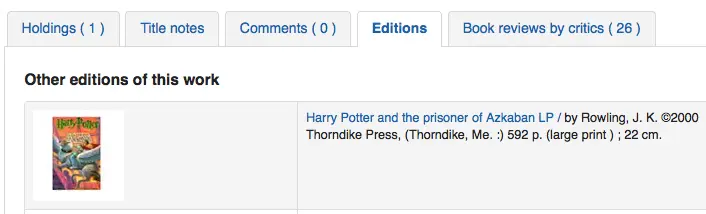
此偏好抓出館藏內題名相同的所有類型的各種版本。館藏將顯示在詳情頁面的 '版本' 分頁。
Note
請您開啟一項或多項 ISBN 服務 (例如 ThingISBN).
Amazon
AmazonAssocTag
詢問:填入亞馬遜書店的推廣帳號 ___。
Note
讀者從圖書館網頁點選進入亞馬遜書店購物,圖書館就能收到介紹費。
描述:
An Amazon Associates Tag allows a library to earn a percentage of all purchases made on Amazon when a patron accesses Amazon's site via links on the library's website. More information about the Amazon Associates program is available at Amazon's Affiliate Program's website, https://affiliate-program.amazon.com/. Before a tag can be obtained, however, the library must first apply for an Amazon Web Services (AWS) account. Applications are free of charge and can be made at https://aws.amazon.com. Once an AWS account has been established, the library can then obtain the Amazon Associates Tag.
AmazonCoverImages
詢問:___ 來自亞馬遜書店的封面資訊於館員介面的搜尋結果與館藏詳情。
值:
不顯示
展示
預設:不顯示
描述:
This system preference makes it possible to either allow or prevent Amazon cover images from being displayed in the Staff Client. Cover images are retrieved by Amazon, which pulls the content based on the first ISBN in the item's MARC record. Amazon offers this service free of charge. If the value for this preference is set to "Show", the cover images will appear in the Staff Client, and if it is set to "Don't show", the images will not appear. Finally, if you're using Amazon cover images, all other cover image services must be disabled. If they are not disabled, they will prevent AmazonCoverImages from functioning properly.
AmazonLocale
詢問:從 ___ 網站取用亞馬遜資訊。
值:
美國
英國
加拿大
法國
德國
印度語系
日文
預設值:美國
OPACAmazonCoverImages
詢問:___ 來自亞馬遜書店的封面資訊於 OPAC 的搜尋結果與館藏詳情。
值:
不顯示
展示
預設:不顯示
描述:
This system preference makes it possible to either allow or prevent Amazon cover images from being displayed in the OPAC. Cover images are retrieved by Amazon, which pulls the content based on the first ISBN in the item's MARC record. Amazon offers this service free of charge. If the value for this preference is set to "Show", the cover images will appear in the OPAC, and if it is set to "Don't show", the images will not appear. Finally, if you're using Amazon cover images, all other cover image services must be disabled. If they are not disabled, they will prevent AmazonCoverImages from functioning properly.
Babelthèque
Babelthèque
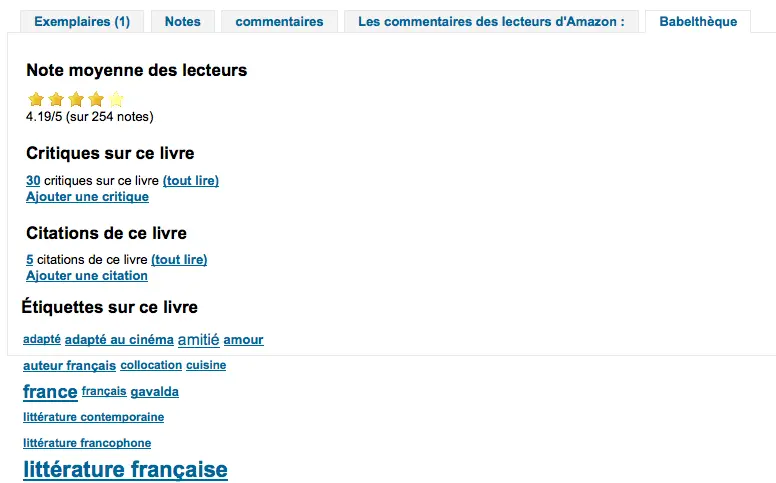
詢問: ___ 加入來自法國文學圖書館的 (書評與引文) 資訊於 OPAC。
值:
做
不
預設值:不
描述:
This preference makes it possible to display a Babelthèque tab in the OPAC, allowing patrons to access tags, reviews, and additional title information provided by Babelthèque. The information which Babelthèque supplies is drawn from the French language-based Babelio, a French service similar to LibraryThing for Libraries. For more information, visit Babelthèque's website. Libraries that wish to allow access to this information must first register for the service. Please note that this information is only provided in French.
Babeltheque_url_js
Asks: Use this URL for the Babelthèque javascript file: ___ (e.g. http://www.babeltheque.com/bw_XX.js)
Babeltheque_url_update
Asks: Use this URL for the Babelthèque periodic update: ___ (e.g. http://www.babeltheque.com/.../file.csv.bz2).
Baker & Taylor
Attention
Baker and Taylor closed in 2025. These preferences have been removed from Koha as of version 26.05.
BakerTaylorBookstoreURL
問:貝克與泰勒書店的 "我的圖書館書店" 應該可以近用於 https:// ___ isbn
Default: [Empty]
描述:
Some libraries generate additional funding for the library by selling books and other materials that are purchased from or have been previously leased from Baker & Taylor. These materials can be accessed via a link on the library's website. This service is often referred to as "My Library Bookstore." In order to participate in this program, the library must first register and pay for the service with Baker & Taylor. Additional information about this and other services provided by Baker & Taylor is available at the Baker & Taylor website. The BakerTaylorBookstoreURL preference establishes the URL in order to link to the library's Baker & Taylor-backed online bookstore, if such a bookstore has been established. The default for this field is left blank; if no value is entered, the links to My Library Bookstore will remain inactive. If enabling this preference, enter the library's Hostname and Parent Number in the appropriate location within the URL. The "key" value (key=) should be appended to the URL, and https:// should be prepended.
Note
空白即停用。
Note
訂購時向貝克與泰勒書店取得此資訊。
BakerTaylorEnabled
詢問:___ 貝克與泰勒連結書店與封面至 OPAC 與館員介面。此項服務需要帳號與密碼 (從封面連結可看到)。
值:
新增
不增加
預設值:不加入
描述:
This preference makes it possible to display Baker & Taylor content (book reviews, descriptions, cover images, etc.) in both the Staff Client and the OPAC. Libraries that wish to display Baker & Taylor content must first register and pay for this service with Baker & Taylor. If Baker & Taylor content is enabled be sure to turn off other cover and review services to prevent interference.
Note
使用此偏好,必須同時設定 BakerTaylorUsername and BakerTaylorPassword 系統偏好
BakerTaylorUsername 與 BakerTaylorPassword
詢問: 近用貝克與泰勒書店時,使用者名稱 ___ 與密碼 ___
Default: [Empty]
說明:
This setting in only applicable if the library has a paid subscription to the external Content Café service from Baker & Taylor. Use the box provided to enter in the library's Content Café username and password. Also, ensure that the BakerTaylorBookstoreURL and BakerTaylorEnabled settings are properly set. The Content Café service is a feed of enhanced content such as cover art, professional reviews, and summaries that is displayed along with Staff Client/OPAC search results. For more information on this service please see the Baker & Taylor website.
Note
訂購時向貝克與泰勒書店取得此資訊。
Coce封面圖片快取
Coce 是遠端 URL 圖片快取。以此選項,封面不是直接從 Amazon、Google 等地取得。此等 URL 係經由網頁服務送至 Coce 由其管理 URL 的快取。
Coce 對 Koha 選擇與顯示封面有許多幫助:
If a book cover is not available from a provider, but is available from another one, Koha will be able to display a book cover, which isn't the case if you don't set Coce up.
Since URLs are cached, it isn't necessary for each book cover to be requested again.
經由 Amazon Product Advertising API 取得 Amazon 的圖書封面,就是可以取得更多的封面(ISBN13)。
Note
Coce 並不是 Koha 專屬的服務。安裝 Koha 並不自動設定 Coce 伺服器。啟用此服務前應先設定 Coce 伺服器。安裝與設定 Coce 的方法在 github 官網 https://github.com/fredericd/coce。
IntranetCoce
Asks: ___ a Coce image cache service in the staff interface.
值:
不啟用
啟用
預設值:不啟用
描述:
Setting this system preference to 'Enable' allows you to fetch cover images from different providers for display of your catalog in the staff interface.
OpacCoce
Asks: ___ a Coce image cache service in the OPAC.
值:
不啟用
啟用
預設值:不啟用
描述:
Setting this system preference to 'Enable' allows you to fetch cover images from different providers for display of your catalog in the OPAC.
CoceHost
詢問:Coce 伺服器的 URL 是 ___
Default: [Empty]
描述:
Coce 伺服器應該是完整的 URL (以 http:// 起頭)。
CoceProviders
詢問:從下列提供者擷取封面 ___
值:
[Select all]
Amazon 網頁服務
Google 圖書
開放式圖書館
Default: [Empty]
描述:
以在此選定的提供者於您的 Koha 目錄顯示封面。
Google
GoogleJackets
詢問:___ 來自 Google 圖書的封面於 OPAC 的搜尋結果與館藏詳情頁面。
值:
新增
不增加
預設值:不加入
描述:
此設定控制經由 Google 圖書 API 取得 Google 圖書資訊庫的封面。必須關閉其他的封面服務,才能使用它。
HTML5 媒體
HTML5MediaEnabled
Asks: Show a tab with a HTML5 media player for files cataloged in field 856 ___
值:
在館員介面與OPAC
在 OPAC
在館員介面
並非如此
預設值:不用
描述:
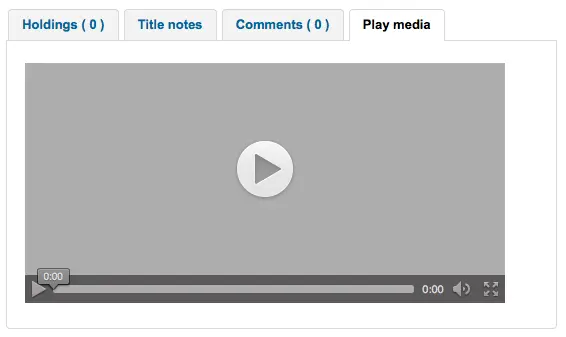
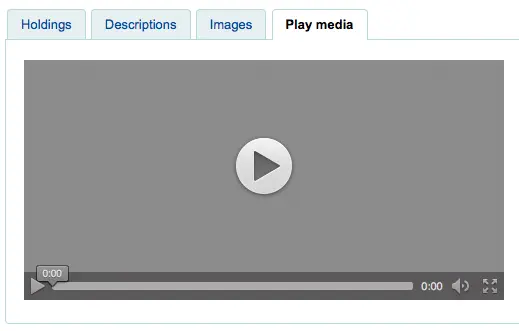
若在 MARC 記錄的 856 欄位包括媒體細目,以此偏好設定為從獨立的分頁以 HTML5 執行/顯示該媒體檔案。
HTML5MediaExtensions
詢問:媒體檔案延伸檔名 ___
預設值:webm|ogg|ogv|oga|vtt
描述:
以直線 (|) 區隔多個檔案名稱
HTML5MediaYouTube
詢問:___ YouTube 連結為影片。
值:
不嵌入
嵌入
預設值:不嵌入
Note
若要開啟此功能,請先啟用 HTML5MediaEnabled
描述:
此偏好將允許指向 YouTube 的 MARC21 856$u 在 HTML5MediaEnabled 中定義的頁面上顯示為可播放影片.
LibraryThing
LibraryThing for Libraries is a pay service. You must first contact LibraryThing directly for pricing and subscription information. Learn more at https://www.librarything.com/forlibraries/. Also, for further configuration instructions please see the LibraryThing Wiki: https://wiki.librarything.com/index.php/Koha
LibraryThingForLibrariesEnabled
詢問:___ 來自 Library Thing 的評論、相關館藏與標籤於 OPAC 館藏的詳情頁面。
值:
不顯示
展示
預設:不顯示
描述:
此設定僅適用於向 LibraryThing 取得的付費服務。它提供推薦圖書之類的額外服務。以及瀏覽標籤、讀者撰寫書評、圖書詳情等。
Note
If this is set to 'show' you will need to enter a value in the LibraryThingForLibrariesID system preference.
LibraryThingForLibrariesID
詢問:以帳號 ___ 近用 Library Thing 網站
Default: [Empty]
描述:
此設定僅適用於向 LibraryThing 取得付費服務代號的圖書館。在輸入盒內鍵入取自 LibraryThing for Libraries 像 ###-######### 的代號。它提供推薦圖書之類的額外服務,以及瀏覽標籤、讀者撰寫書評、圖書詳情等。
LibraryThingForLibrariesTabbedView
詢問:顯示來自 Library Thing for Libraries 的資訊 ___
值:
書目資訊方式
在分頁
預設值:書目資訊方式
描述:
此設定僅適用於向 LibraryThing 取得付費服務代號的圖書館。它顯示推薦購買與封面等資訊給讀者。同時在詳情頁面提供瀏覽標籤、讀者撰寫書評、虛擬圖書館等進階功能。
ThingISBN
詢問:___ ThingISBN 服務於顯示其他版本
值:
不要使用
使用
預設值:不用
描述:
設定為 '使用' 於館藏詳情頁面顯示 "版本" 分頁。列出版本及其封面 (若已啟用封面服務) 與書目資訊。其內容來自 LibraryThing 的 ThingISBN 網頁服務。每天 1,000 筆免費提供給非營利網站。
Note
Requires FRBRizeEditions and/or OPACFRBRizeEditions set to 'show'
Note
這項服務與 Library Thing for Libraries 不同它是免費。
在地或遠端封面圖片
AllowMultipleCovers
要求:___ 將多個圖片附加到每個書目記錄和館藏.
值:
允許
不允許
預設:不允許
描述:
如果此偏好設為 '允許' ,您可以上傳多個圖片,這些圖片將顯示在 OPAC 和館員介面中書目記錄的圖片頁籤中.
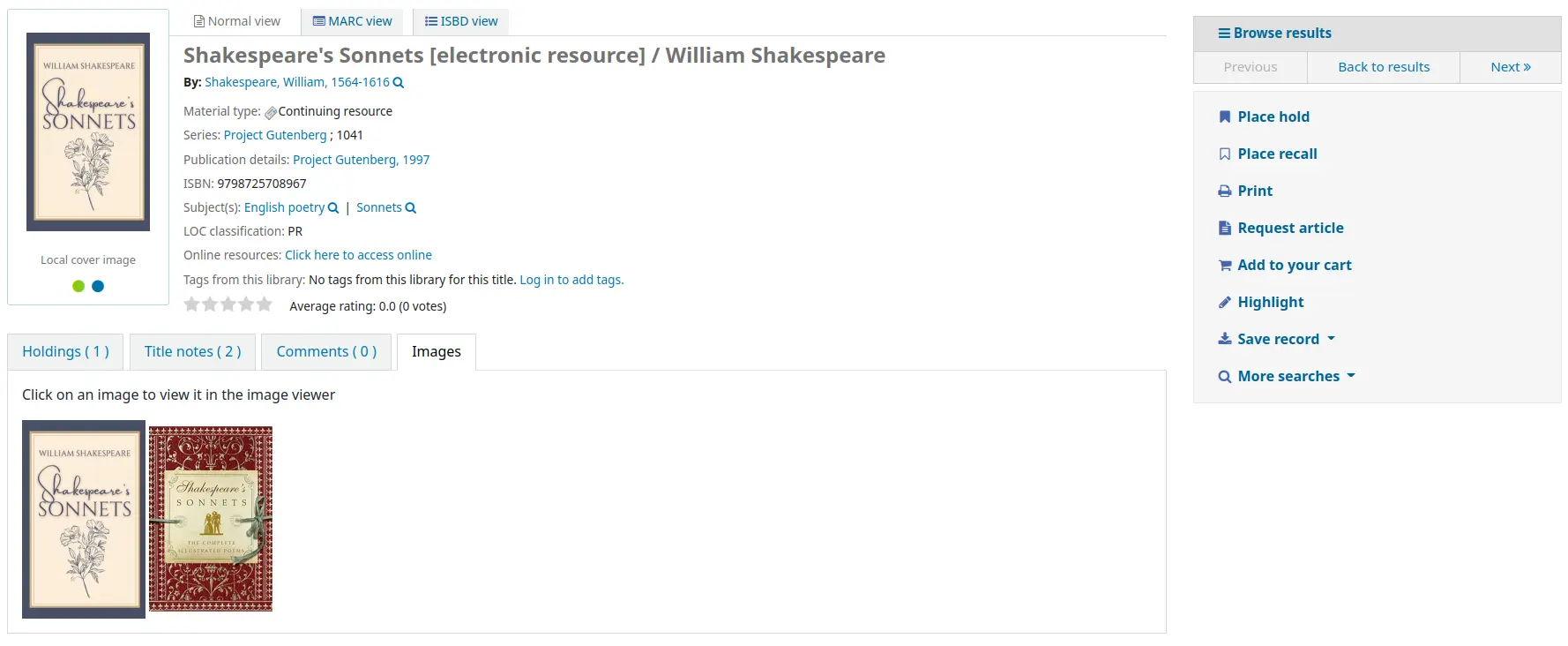
此系統偏好要求將 LocalCoverImages 和 OPACLocalCoverImages 之一或兩者設定為 '顯示'.
客製化封面
詢問:___館員介面中的自訂遠端 URL 圖片。
值:
不顯示
展示
預設:不顯示
描述:
如果您使用 CustomCoverImagesURL,則此偏好指示您是否希望這些封面圖片出現在館員介面中.
如果您希望這些圖片出現在 OPAC 中,請使用 OPACCustomCoverImages.
OPACLocalCoverImages
詢問:___ OPAC 上自訂遠端 URL 圖片.
值:
不顯示
展示
預設:不顯示
描述:
如果您使用 CustomCoverImagesURL,則此偏好指示您是否希望這些封面圖片出現在 OPAC 中.
如果您希望這些圖片出現在館員介面中,請使用 CustomCoverImages.
CustomCoverImagesURL
詢問:使用以下的搜尋網址:___
Default: [Empty]
描述:
您可以使用代碼來代替在網址裡的書目資料: {isbn}, {issn}, {normalized_isbn}
範例: http://www.mylibrarysite.com/covers/{isbn}.png
您同樣可以在網址裡使用MARC欄位及分欄,像是: {024$a}
舉例來說: http://www.mylibrarysite.com/covers/{024$a}.png
如果您希望這些圖片出現在館員介面中,請確保啟用 CustomCoverImages,如果您希望這些圖片出現在 OPAC 中,請確保啟用 OPACCustomCoverImages.
LocalCoverImages
詢問:___ 館員介面搜尋和詳細資料頁面上的本地封面圖片.
值:
不顯示
展示
預設:不顯示
描述:
將此偏好為 '顯示' 可讓您將自己的封面圖片上傳到書目記錄並將其顯示在館員介面的詳細資訊頁面上.
參見:
OPACLocalCoverImages
詢問:___ 在地封面於 OPAC 搜尋與詳情頁面。
值:
不顯示
展示
預設:不顯示
描述:
將此偏好為 '顯示' 可讓您將自己的封面圖片上傳到書目記錄並將其顯示在詳細資料頁面和 OPAC 中的搜尋結果上.
參見:
手冊
KohaManualBaseURL
詢問:Koha 手冊的位置 ___
預設:https://koha-community.org/manual/
描述:
您可指定 Koha 手冊的位置。這是按下右上角 '說明' 時打開手冊的 URL。
預設,使用 Koha 手冊,不過也可以透過系統偏好使用自己選定的頁面。
If the URL starts with '/', the value of staffClientBaseURL will be used as a prefix.
說明通常放在在版本 / 語言 / 格式 (/17.11/en/html)之後
KohaManualLanguage
詢問: 線上手冊 ___ 的語言
預設值:英文
描述:
預設,Koha介面的語系採用手冊使用的語系。然而,若手冊未翻譯為該語系,系統偏好會回到英語。
NoveList Select
NoveList Select 不是免費服務。向 Ebsco 的業務代表洽詢取得將內容置於 OPAC 的登入資訊。
Note
- 小說家精選的搜尋結果不包含封面圖片
and bibliographic detail pages. You can choose any other cover image service for this content or you can contract with Ebsco to get access to the Baker & Taylor Content Cafe for an added fee.
NovelistSelectEnabled
詢問:___ NoveList Select 內容於 OPAC。
值:
新增
不增加
Note
Enabling this requires that you have entered a user profile in the NovelistSelectProfile system preference and a password in the NovelistSelectPassword system preference.
預設值:不加入
描述:
來自 Ebsco 的 NoveList Select 是付費服務可在 OPAC 提供額外的內容。
NovelistSelectPassword
Asks: Access Novelist Select using password ___.
Warning
This information will be visible if someone views the source code on your OPAC.
Default: [Empty]
描述:
來自 Ebsco 的 NoveList Select 是付費服務可在 OPAC 提供額外的內容。
NovelistSelectProfile
Asks: Access Novelist Select using user profile ___ on the OPAC.
Warning
This information will be visible if someone views the source code on your OPAC.
Default: [Empty]
描述:
來自 Ebsco 的 NoveList Select 是付費服務可在 OPAC 提供額外的內容。
NovelistSelectStaffEnabled
Asks: ___ Novelist Select content to the staff interface (requires that you have entered in a user profile and password, which can be seen in image links).
值:
不增加
新增
預設值:不加入
NovelistSelectStaffProfile
Asks: Access Novelist Select using user profile ___ on the staff interface.
Default: [Empty]
描述:
Without this value being set, Novelist features will be disabled on the staff interface until a correct profile is obtained from Novelist and entered into the field.
Note
此值必須獨立於 OPAC 設定檔供 NoveList 使用
NovelistSelectStaffView
Asks: Display Novelist Select staff interface content ___.
值:
在館藏表單之上
在館藏表單之下
在分頁
預設值:在分頁
NovelistSelectView
詢問: 顯示 Novelist Select 的內容 ___
值:
在館藏表單之上
在館藏表單之下
在 OPAC 分頁
在右方儲存記錄下拉選單之下
預設值:在 OPAC 分頁
描述:
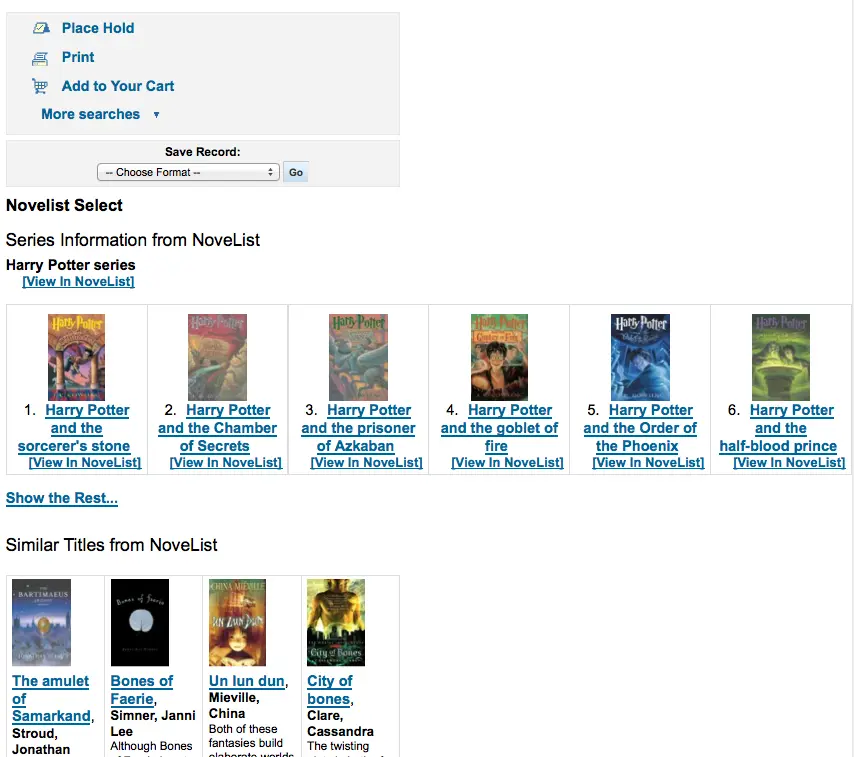
Novelist Select 提供不少內容,可以在四個位置顯示其內容。預設值是顯示在館藏資料表的分頁。
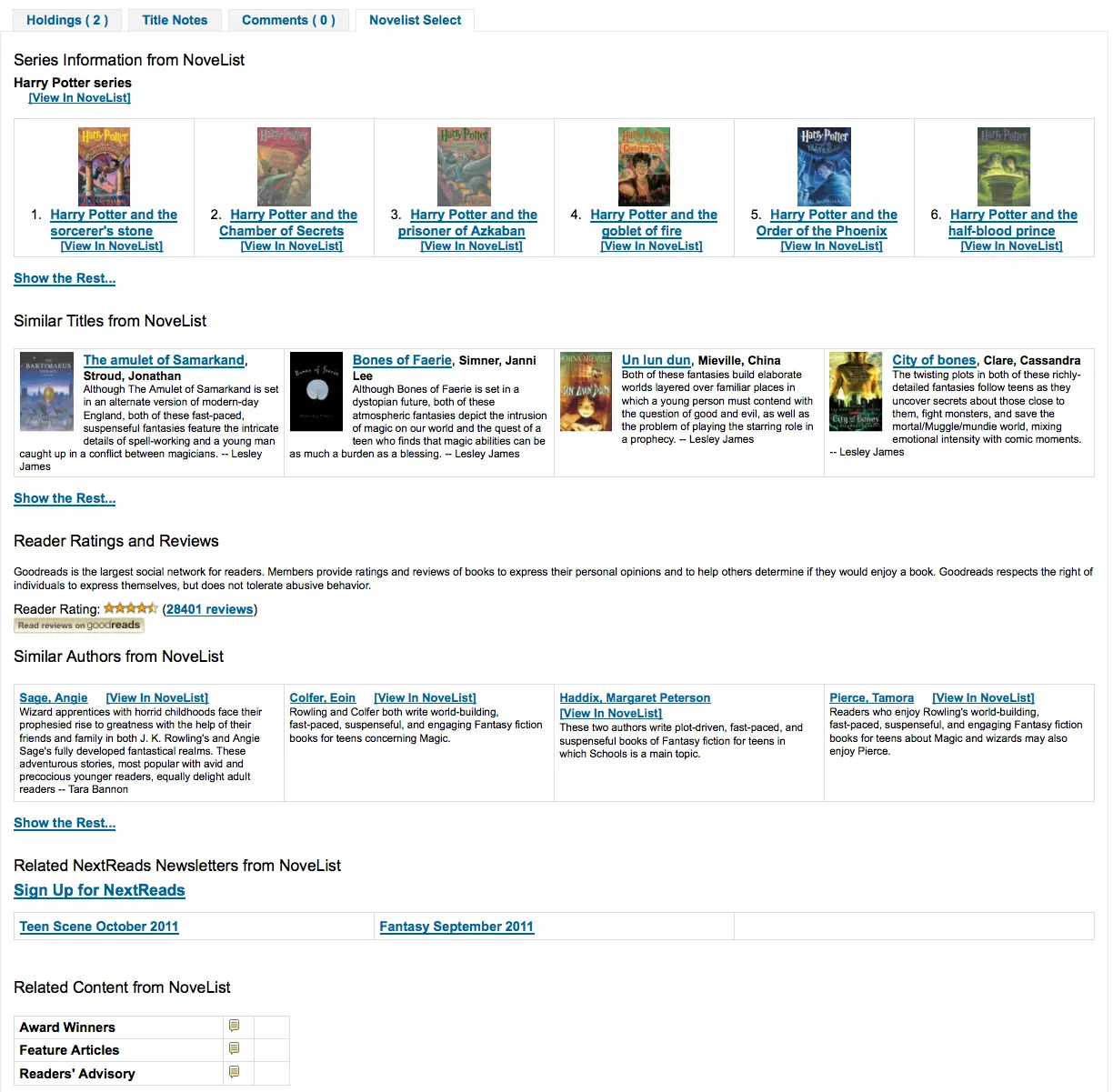
顯示在館藏表單的上方或下方內容是一樣的。若顯示在頁面右欄其內容亦相同,但受限於空間顯示方式略有不同。
開放式圖書館
OpenLibraryCovers
詢問:在 OPAC 的搜尋結果與館藏詳情頁面 ___ 來自 Open Library 的封面。
值:
新增
不增加
預設值:不加入
描述:
此設定控制經由 Open Library API 取得的免費 Open Library 資料庫封面。必須關閉其他封面服務此設定才生效。
OpenLibrarySearch
詢問:從 OPAC 的 Open Libary ___ 的搜尋結果。
值:
不顯示
展示

預設:不顯示
Overdrive
OverDrive 是一項付費服務. 您必須先直接聯絡 OverDrive 以取得定價和訂閱資訊. 使用以下系統偏好設定,將把 Overdrive 搜尋結果整合至您的 OPAC 搜尋中.
此外,您可以使用 OverDriveCirculation 讓您的讀者透過他們的 Koha OPAC 帳戶管理他們的 OverDrive 借出.
訂閱圖書館後,您需要向 OverDrive 提出申請:
您訂閱的 OverDrive 驗證名稱
OverDrive API Client key and Client secret
OverDrive Library ID
OverDrive Website ID
OPACOverDrive
版本
此功能最初是在 Koha 的 24.11 版本中引入的。
Asks: ___ OverDrive integration in the OPAC.
值:
不啟用
啟用
預設值:不啟用
描述:
此系統偏好是 OPAC 中 OverDrive 整合的主要開關.
在將此偏好切換為 '啟用' 之前,請先新增您的 OverDriveAuthname、OverDriveLibraryID,以及 OverDriveClientKey 和 OverDriveClientSecret.
OverDriveAuthname
詢問: 使用 OverDrive Authname ___ 進行驗證 (如果 OverDrive 圖書館表中未設定單一分館 authname,則將用作後備).
描述:
如果圖書館只有一個 OverDrive Authname,則應在此系統偏好中輸入它.
如果圖書館有多個具有特定 Authname 的分館機構 (例如,在聯盟的情況下),他們將需要透過點擊 OverDrive 圖書館 authnames 表為每個分館機構分配正確的 authname.
OverDriveCirculation 和 OverDriveUsername 和 OverDrivePasswordRequired
詢問: ___ 使用者存取他們的 OverDrive 流通歷史記錄,並流通館藏. Overdrive 使用讀者的 ___ 來讓使用者存取 OverDrive. 使用者存取 OverDrive 的密碼是 ___. 如果您啟用存取權限,則必須有一個在 OverDrive 註冊的 SIP 連結,以便針對 Koha 進行使用者驗證.
OverDriveCirculation 的值:
不啟用
啟用
OverDriveUsername 的值:
card number
使用者名稱
OverDrivePasswordRequired 的值:
不要求
要求
Default: [Empty]
描述:
OverDriveCirculation 系統偏好設定告訴 Koha 您的使用者是否可以存取他們的 Overdrive 流通歷史記錄並且能夠流通館藏. OverDriveUsername 和 OverDrivePasswordRequired 控制使用者如何登入 OverDrive.
OverDriveClientKey and OverDriveClientSecret
Asks: Include OverDrive availability information with the client key ___ and client secret ___
Default: [Empty]
描述:
OverDrive customers can get this information by visiting the OverDrive Developer Portal and following the instructions found there to apply as an API developer. Once this data and the OverDriveLibraryID are populated you will see OverDrive results on your OPAC searches.
OverDriveLibraryID
詢問: 從圖書館 # 的 ___ OverDrive 目錄顯示館藏
Default: [Empty]
描述:
OverDrive customers can get this information by visiting the OverDrive Developer Portal and following the instructions found there to apply as an API developer. Once this data and the OverDriveClientKey and OverDriveClientSecret are populated you will see OverDrive results on your OPAC searches.
OverDriveWebsiteID
詢問: 使用 OverDrive 網站 ID # ___ 進行身份驗證.
Default: [Empty]
描述:
這將向 Koha 指示在哪個網站 ID 上進行身份驗證. 此資訊由 OverDrive 提供.
Syndetics
Proquest Syndetics is a paid service. Contact them for pricing and subscription information at https://proquest.syndetics.com/.
若要顯示 Proquest Syndetics 服務提供的增強內容,您的 MARC 記錄中需要 ISBN.
SyndeticsAwards
詢問:在 OPAC ___ 得自 Syndetics 書目中心的作品得獎資訊。
值:
不顯示
展示
預設:不顯示
描述:
When this option is set to "Show", Proquest Syndetics provides its clients with a list of awards that any title has won. With this service enabled the library can display those awards for each book on its website. For each book or item that comes up during a user search, the list of awards for that title will be displayed. When a user clicks on a given award, information about that award is presented along with a list of the other titles that have won that award. If the user clicks on any title in the list, they will see holdings information about that title in their region. This option is a paid subscription service. The SyndeticsClientCode must be entered and the SyndeticsEnabled option must be activated before this service can be used.
SyndeticsClientCode
詢問:使用客戶碼 ___ 進入 Syndetics。
Default: [Empty]
描述:
Once the library signs up for Proquest Syndetics' services, they provide the library with an access code. (Visit the Proquest Syndetics website at https://proquest.syndetics.com/ for more information.) This is the code that must be entered to access Proquest Syndetics' subscription services. This is a paid subscription service. This value must be entered before SyndeticsEditions can be enabled. If the code is lost, corrupted, or forgotten, a new one can be obtained from Proquest Synetics.
Note
需直接從 Syndetics 取得客戶碼。
SyndeticsCoverImages 與 SyndeticsCoverImageSize
SyndeticsCoverImages 預設值:不顯示
SyndeticsCoverImageSize 預設值:中
詢問:___ 得自 Syndetics 書目中心的封面以及採用 ___ 型大小於 OPAC 詳情頁面。
SyndeticsCoverImages 值:
不顯示
展示
SyndeticsCoverImageSize 值:
中等
大
Default: [Empty]
說明:
When enabled, SyndeticsCoverImages, allows libraries to display Proquest Syndetics' collection of full-color cover images for books, videos, DVDs and CDs on their OPAC. For each book or item that comes up during a user search, the cover image for that title will be displayed. Since these cover images come in three sizes, the optimum size must be selected using the SyndeticsCoverImageSize preference after SyndeticsCoverImages are enabled. The cover images come in two sizes: mid-size (187 x 187 pixels), and large (400 x 400 pixels). Proquest Syndetics is a paid subscription service. The SyndeticsClientCode must be entered and the SyndeticsEnabled option must be activated before this service can be used. Other cover image preferences should also be disabled to avoid interference.
SyndeticsEditions
詢問:在 OPAC 詳情頁面 ___ 得自 Syndetics 書目中心的其他版本資訊
值:
不顯示
展示
Note
- Requires OPACFRBRizeEditions set to
'show'
預設:不顯示
描述:
When enabled this option shows information on other editions of a title from Proquest Syndetics on the item detail pages of the OPAC. It is a paid subscription service. The SyndeticsClientCode must be entered and the SyndeticsEnabled option must be activated before this service can be used.
SyndeticsEnabled
詢問:___ 從 Syndetics 取得的內容。
值:
不要使用
使用
預設值:不用
描述:
When this option is enabled any of the Proquest Syndetics options can be used.
Note
- 需要您輸入您的
SyndeticsClientCode before this content will appear.
SyndeticsExcerpt
詢問:在 OPAC 詳情頁面 ___ 得自 Syndetics 書目中心的摘要資訊。
值:
不顯示
展示
預設:不顯示
描述:
This preference allows Proquest Syndetics to display excerpts given to them from selected publishers. The excerpts are available from prominently reviewed new titles, both fiction and non-fiction. The excerpts include poems, essays, recipes, forwards and prefaces.
SyndeticsReviews
詢問:在 OPAC 詳情頁面 ___ 得自 Syndetics 書目中心的書評。
值:
不顯示
展示
預設:不顯示
描述:
Proquest Syndetics Reviews is an accumulation of book reviews available from a variety of journals and serials. The reviews page displays colored images of reviewed books dust jackets, partnered with the names of the journal or serial providing the review. Clicking on an icon opens a window revealing the book title, author's name, book cover icon and the critic's opinion of the book.
SyndeticsSeries
詢問: OPAC 上的記錄詳細資訊頁面上,___ 提供有關 Syndetics 系列中其他標題的資訊.
值:
不顯示
展示
預設:不顯示
描述:
Each fiction title within a series is linked to the complete series record. The record displays each title in reading order and also displays the publication order, if different. Alternate series titles are also displayed.
SyndeticsSummary
詢問:在 OPAC 詳情頁面 ___ 得自 Syndetics 書目中心的摘要資訊。
值:
不顯示
展示
預設:不顯示
描述:
Providing more than 5.6 million summaries and annotations derived from book jackets, edited publisher copy, or independently written annotations from Book News, Inc. Covering fiction and non-fiction, this summaries option provides annotations on both trade and scholarly titles.
SyndeticsTOC
詢問:在 OPAC 詳情頁面 ___ 得自 Syndetics 書目中心的目次。
值:
不顯示
展示
預設:不顯示
描述:
This system preference allows staff and patrons to review the Table of Contents from a wide variety of publications from popular self-help books to conference proceedings. Specific Information access is the main purpose for this option, allowing patrons guidance to their preferred section of the book. Special arrangements with selected book services are used to obtain the table of contents for new publications each year.
標籤
TagsInputOnDetail
詢問:___ 讀者從 OPAC 的館藏詳情頁面新增標籤。
值:
允許

不允許
預設值:允許
TagsInputOnList
詢問:___ 讀者從 OPAC 的搜尋結果新增標籤。
值:
允許
不允許
預設:不允許
描述:
此系統偏好用於控制讀者是否可以為搜尋結果、清單和購物車中的標題新增標籤.
當設定為 '允許' 時,每個搜尋結果下方、清單中和購物車中的每個標題下方都會顯示一個用於新增標籤的按鈕.
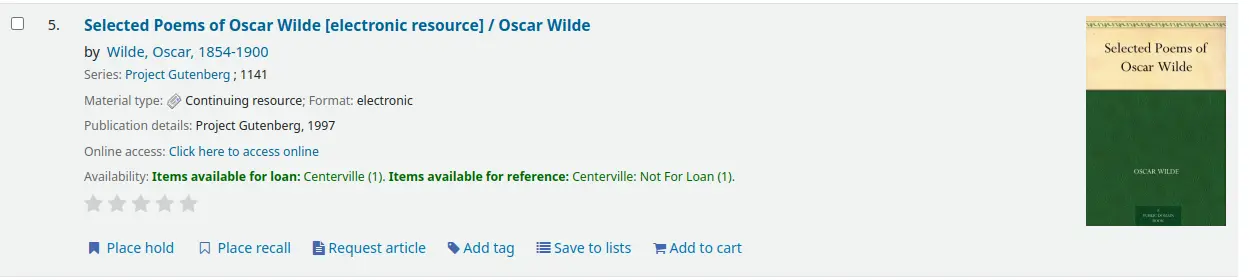
讀者還可以選擇幾個標題並標記它們.