網路服務
Koha provides a number of APIs allowing access to its data and functions.
OAI-PMH
開放檔案存取協定 (OAI-PMH) 有兩組 '參與者':資料提供者與服務提供者。資料提供者 (開放檔案、典藏庫) 提供自由近用的後設資料,以及可能,但不是必要的,自由近用全文或其他資源。OAI-PMH 提供簡便、低門檻的解決方案給資料提供者。服務提供者運用資料提供者的 OAI 介面擷取並儲存後設資料。沒有向資料提供者提出即時搜尋要求;而是,以OAI-PMH 擷取資料。
Learn more about OAI-PMH at https://www.openarchives.org/pmh/
Koha can act as both Data Provider and Service Provider. This section documents its use as Data Provider. For information on using it as a Service Provider, see the OAI repositories section.
To enable OAI-PMH in Koha edit the OAI-PMH preference.
Once enabled you can visit https://opac.example.org/cgi-bin/koha/oai.pl to
see your file.
By default Koha won't include item information in OAI-PMH result sets, but they can be added by using the include_items option in the a configuration file linked from OAI-PMH:ConfFile.
Note that the sample conf file below contains entries for both marc21 and marcxml. The metadata prefix marc21 is the one recommended by the OAI-PMH guidelines <https://www.openarchives.org/OAI/2.0/guidelines-marcxml.htm>. The prefix marcxml is supported, but it is only included for backwards compatibility with older systems. The metadata prefix oai_dc is mandated by the standard as a fallback.
範例 OAI conf 檔案
format:
  vs:
    metadataPrefix: vs
    metadataNamespace: http://veryspecial.tamil.fr/vs/format-pivot/1.1/vs
    schema: http://veryspecial.tamil.fr/vs/format-pivot/1.1/vs.xsd
    xsl_file: /usr/local/koha/xslt/vs.xsl
  marc21:
     metadataPrefix: marc21
     metadataNamespace: https://www.loc.gov/MARC21/slim https://www.loc.gov/standards/marcxml/schema/MARC21slim
     schema: https://www.loc.gov/MARC21/slim https://www.loc.gov/standards/marcxml/schema/MARC21slim.xsd
     include_items: 1
  marcxml:
     metadataPrefix: marcxml
     metadataNamespace: https://www.loc.gov/MARC21/slim https://www.loc.gov/standards/marcxml/schema/MARC21slim
     schema: https://www.loc.gov/MARC21/slim https://www.loc.gov/standards/marcxml/schema/MARC21slim.xsd
     include_items: 1
  oai_dc:
     metadataPrefix: oai_dc
     metadataNamespace: https://www.openarchives.org/OAI/2.0/oai_dc/
     schema: https://www.openarchives.org/OAI/2.0/oai_dc.xsd
     xsl_file: /usr/local/koha/koha-tmpl/intranet-tmpl/xslt/UNIMARCslim2OAIDC.xsl
選項包括:
xsl_file:用於將 Koha MARCXML 資料轉換為所需結構/格式的 XSLT 檔案的路徑. 例如,如果您需要產生一些特定的都柏林核心段而不是僅僅是預字段,它會很有用.
include_items: 如果設定為 1,則館藏資訊將根據 MARC 框架的對應包含在回應中.
expand_avs:如果設定為 1,所有編碼值將擴展並附帶說明. 其中包括圖書館名稱、館藏類型描述、容許值說明和分類來源說明.
所有這些選項都可以與不同的 metadataPrefix 條目一起使用,允許消費者要求其中一個.
SRU 伺服器
Koha implements the Search/Retrieve via URL (SRU) protocol. More information about the protocol itself can be found at https://www.loc.gov/standards/sru/. The version implemented is version 1.1.
解釋
查看指定伺服器應用 SRU 的資訊,您應以無參數的方式近用至伺服器的 Explain 檔案。如:http://myserver.com:9999/biblios/。回應的資料是 XML 格式看來如下且提供 SRU 伺服器的預設設定資訊。
       <zs:explainResponse>
            <zs:version>1.1</zs:version>
            <zs:record>
                 <zs:recordSchema>http://explain.z3950.org/dtd/2.0/</zs:recordSchema>
                 <zs:recordPacking>xml</zs:recordPacking>
                 <zs:recordData>
                 <explain xml:base="zebradb/explain-biblios.xml">
                 <!--
                 try stylesheet url: http://./?stylesheet=docpath/sru2.xsl
                 -->
            <serverInfo protocol="SRW/SRU/Z39.50">
                 <host>biblibre</host>
                 <port>9999</port>
                 <database>biblios</database>
            </serverInfo>
            <databaseInfo>
                 <title lang="en" primary="true">Koha 3 Bibliographic SRU/SRW/Z39.50 server</title>
                 <description lang="en" primary="true">Koha 3 Bibliographic Server</description>
                 <links>
                      <sru>http://biblibre:9999</sru>
                 </links>
            </databaseInfo>
            <indexInfo>
                 <set name="cql" identifier="info:srw/cql-context-set/1/cql-v1.1">
                      <title>CQL Standard Set</title>
                 </set>
                 <index search="true" scan="true" sort="false">
                 <title lang="en">CQL Server Choice</title>
                 <map>
                      <name set="cql">serverChoice</name>
                 </map>
            <map>
               <attr type="1" set="bib1">text</attr>
               </map>
          </index>
      <index search="true" scan="true" sort="false">
         <title lang="en">CQL All</title>
             <map>
<name set="cql">all</name>
</map>
<map>
<attr type="1" set="bib1">text</attr>
</map>
</index>
<!-- Record ID index -->
<index search="true" scan="true" sort="false">
<title lang="en">Record ID</title>
<map>
<name set="rec">id</name>
</map>
<map>
<attr type="1" set="bib1">rec:id</attr>
<attr type="4" set="bib1">3</attr>
</map>
</index>
搜尋
此網址:http://myserver.com:9999/biblios?version=1.1&operation=searchRetrieve&query=reefs 由下列元素構成:
SRU 伺服器的網址是:http://myserver.com:9999/biblios?
搜尋部份有 3 個必備參數:版本、運算元與詢問內容。這些參數應以 key=value 的格式呈現,且可以 & 字元連結。
One can add optional parameters to the query, for instance maximumRecords indicating the maximum number of records to be returned by the server. So http://myserver.com:9999/biblios?version=1.1&operation=searchRetrieve&query=reefs&maximumRecords=5 will only get the first 5 results results from the server.
在 "運算元" 鍵有兩個值: scan 或 searchRetrieve。
若 operation=searchRetrieve,則搜尋鍵詞應為詢問。如:operation=searchRetrieve&query=reefs
若 operation=scan,則搜尋鍵詞應為 scanClause。如:operation=scan&scanClause=reefs
etc/zebradb/biblios/etc/bib1.att 定義系統內存在的 Zebra/3950 索引。如:可看到對主題與題名的索引分別是:att 21 Subject 與 att 4 Title。
當另個使用者使用我的題名索引 (index.dc.title = 1=4) 就可看到位在 etc/zebradb/pqf.properties 的 pqf.properties 檔案已使用我的主題索引 (index.dc.subject = 1=21) 我知道這個是我的主題索引因為在我的 bib1.att 檔案裡見過它,稱為 with =1=21 於 Z3950: 所以 index.dc.subject = 1=21 精確指向我的主題索引。且題名為 1=4 所以 index.dc.title = 1=4 精確指向題名索引。我可以像在搜尋盒裡一樣建構自己的搜尋,祗要加入 "query" 鍵:query=Subject=reefs and Title=coral 在主題內搜尋 "reefs" 且在題名內搜尋 "coral"。完整的網址像是這樣 http://myserver.com:9999/biblios?version=1.1&operation=searchRetrieve&query=Subject=reefs and Title=coral 若我要限制祗呈現 5 筆記錄,則為 http://myserver.com:9999/biblios?version=1.1&operation=searchRetrieve&query=Subject=reefs and Title=coral&maximumRecords=5
我也可使用截切、相關等用法。它們都定義在我的 pqf.properties 檔案內。我可看到其用法如:
 position.first              = 3=1 6=1
# "first in field"
 position.any                = 3=3 6=1
   # "any position in field"
所以,舉例來說我想要找尋題名起頭為 "coral" 的紀錄,我可以做這樣的搜尋:http://myserver.com:9999/biblios?version=1.1&operation=searchRetrieve&query=Title=coral first
取得搜尋結果
我的搜尋 http://univ_lyon3.biblibre.com:9999/biblios?version=1.1&operation=searchRetrieve&query=coral reefs&maximumRecords=1 提取一筆紀錄。回應的內容像這樣:
          <zs:searchRetrieveResponse>
<zs:version>1.1</zs:version>
<zs:numberOfRecords>1</zs:numberOfRecords>
<zs:records>
<zs:record>
<zs:recordPacking>xml</zs:recordPacking>
<zs:recordData>
<record xsi:schemaLocation="http://www.loc.gov/MARC21/slim http://www.loc.gov/ standards/marcxml/schema/MARC21slim.xsd">
<leader> cam a22 4500</leader>
<datafield tag="010" ind1=" " ind2=" ">
<subfield code="a">2-603-01193-6</subfield>
<subfield code="b">rel.</subfield>
<subfield code="d">159 F</subfield>
</datafield>
<datafield tag="020" ind1=" " ind2=" ">
<subfield code="a">FR</subfield>
<subfield code="b">00065351</subfield>
</datafield>
<datafield tag="101" ind1="1" ind2=" ">
<subfield code="c">ita</subfield>
</datafield>
<datafield tag="105" ind1=" " ind2=" ">
<subfield code="a">a z 00|y|</subfield>
</datafield>
<datafield tag="106" ind1=" " ind2=" ">
<subfield code="a">r</subfield>
</datafield>
<datafield tag="100" ind1=" " ind2=" ">
<subfield code="a">20091130 frey50 </subfield>
</datafield>
<datafield tag="200" ind1="1" ind2=" ">
<subfield code="a">Guide des récifs coralliens / A Guide to Coral Reefs</subfield>
<subfield code="b">Texte imprimé</subfield>
<subfield code="e">la faune sous-marine des coraux</subfield>
<subfield code="f">A. et A. Ferrari</subfield>
</datafield>
<datafield tag="210" ind1=" " ind2=" ">
<subfield code="a">Lausanne</subfield>
<subfield code="a">Paris</subfield>
<subfield code="c">Delachaux et Niestlé</subfield>
<subfield code="d">cop. 2000</subfield>
<subfield code="e">impr. en Espagne</subfield>
</datafield>
<datafield tag="215" ind1=" " ind2=" ">
<subfield code="a">287 p.</subfield>
<subfield code="c">ill. en coul., couv. ill. en coul.</subfield>
<subfield code="d">20 cm</subfield>
</datafield>
......
<idzebra>
<size>4725</size>
<localnumber>2</localnumber>
<filename>/tmp/nw10BJv9Pk/upd_biblio/exported_records</filename>
</idzebra>
</record>
</zs:recordData>
<zs:recordPosition>1</zs:recordPosition>
</zs:record>
</zs:records>
</zs:searchRetrieveResponse>
ILS-DI
As of writing, the self documenting ILS-DI is the most complete interface. After it has been enabled as described in the
ILS-DI system preferences
section, the documentation should be available at
https://opac.example.org/cgi-bin/koha/ilsdi.pl
JSON 報表服務
Koha 為使用 引導式報告精靈 或 SQL 報表 功能儲存的每個報表實作了一個 JSON 報表服務.
報表預設為不公開祗有被授權的使用者才能看到。若揭示為 公開 則任何人均可看到。祗有不含個人資訊的報表,才可以公開。
經由以下的 URL 近用該等報表:
Public reports:
https://opac.example.org/cgi-bin/koha/svc/report?id=REPORTIDNon-public reports:
https://staff-interface.example.org/cgi-bin/koha/svc/report?id=REPORTID
還有其他可用的參數:
Instead of accessing the report by REPORTID you can also use the report's name:
https://opac.example.org/cgi-bin/koha/svc/report?name=REPORTNAMEorhttps://staff-interface.example.org/cgi-bin/koha/svc/report?name=REPORTNAMEFor easier development there is also an option to generate an annotated output of the data. It will generate an array of hashes that include the field names as keys:
https://opac.example.org/cgi-bin/koha/svc/report?name=REPORTNAME&annotated=1orhttps://staff-interface.example.org/cgi-bin/koha/svc/report?name=REPORTNAME&annotated=1
版本化的 RESTful API 工作
There is an ongoing effort to converge the APIs above into a single versioned
set of modern RESTful endpoints documented using the OpenAPI standard and
available by default under https://opac.example.org/api/v1/
您可以在 api.koha-community.org 找到適用於您的 Koha 版本的 API 完整文件.
授與 OAuth2 客戶端認證
Koha supports the OAuth2 client credentials grant as a means to secure the API for using it from other systems to adhere to current industry standards. More information on the OAuth2 client credentials grant standard can be found here.
讀者的 API 金鑰管理介面
In order for API keys to be create for patrons, the system preference RESTOAuth2ClientCredentials must be enabled for the option to appear in a patron record.
瀏覽讀者紀錄並選擇 更多 > 管理 API 金鑰
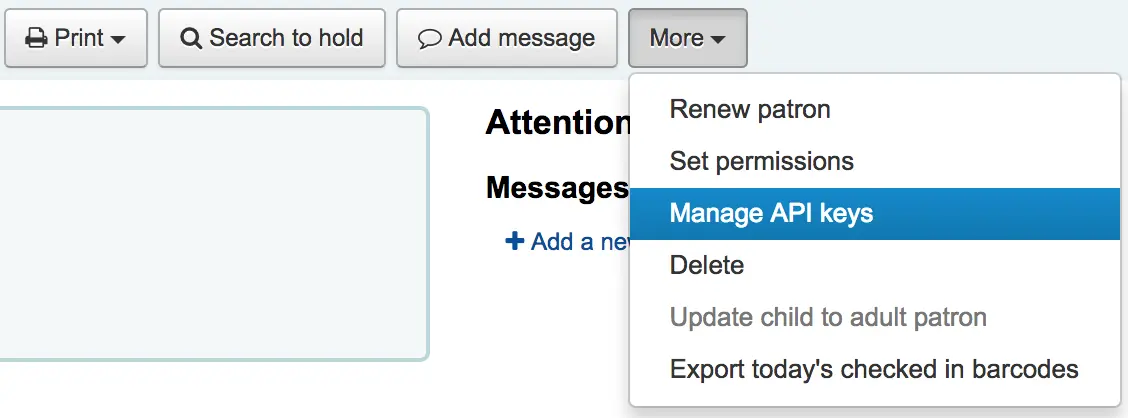
若讀者沒有 API 金鑰,則顯示需要客戶 id/secret 配對的訊息

鍵入客戶 id/secret 配對說明並按儲存
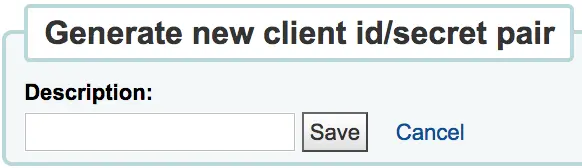
koha 將產生客戶 id/secret 配對做為連結第三方系統的認證基礎

按 API 認證配對旁的撤銷鈕,將停用指定定配對認證直到再次啟用它
條碼影像產生器
Koha provides a barcode image generator on both the staff interface and the OPAC. Both require a user to be logged in to use the service, to prevent abuse by third parties.
For example:
https://opac.example.org/cgi-bin/koha/svc/barcode?barcode=123456789&type=UPCE
or
https://staff-interface.example.org/cgi-bin/koha/svc/barcode?barcode=123456789&type=UPCE
上面的 URL 將使用 UPCE 條碼格式為條碼“123456789”生成條碼影像。
可用的條碼類型有:* Code39 * UPCE * UPCA * QRcode * NW7 * Matrix2of5 * ITF * Industrial2of5 * IATA2of5 * EAN8 * EAN13 * COOP2of5
如果未指定類型,則將使用 Code39。
預設情況下,條碼圖片也將包含條碼的文字. 如果不希望這樣,可以傳遞參數 "notext" 來抑制這種行為.
For example:
https://opac.example.org/cgi-bin/koha/svc/barcode?barcode=123456789¬ext=1
or
https://staff-interface.example.org/cgi-bin/koha/svc/barcode?barcode=123456789¬ext=1
將產生一個條碼影像 123456789,下面沒有文字“123456789”。
This service can be used to embed barcode images into slips and notices printed from the browser, and to embed a patron card number into the OPAC, among other possibilities.