Webservices
Koha provides a number of APIs allowing access to its data and functions.
OAI-PMH
Für das Open Archives Initiative Protocol for Metadata Harvesting (OAI-PMH) gibt es zwei Gruppen von „Teilnehmern“: Datenprovider und Serviceprovider. Datenprovider (offene Archive und Repositorien) ermöglichen freien Zugang auf ihre Metadaten und können, aber müssen nicht, freien Zugriff auf Volltexte und andere Ressourcen bereitstellen. OAI-PMH ist eine einfach zu implementierende, niedrigschwellige Lösung für Datenprovider. Serviceprovider verwenden die OAI-Schnittstellen der Datenprovider um Metadaten zu harvesten und zu speichern. Bitte beachten Sie, dass dies bedeutet, dass es keine Live-Suchanfragen an die Datenprovider gibt, sondern viel mehr werden Dienste auf Basis der über OAI-PMH gesammelten Daten angeboten.
Learn more about OAI-PMH at https://www.openarchives.org/pmh/
Koha can act as both Data Provider and Service Provider. This section documents its use as Data Provider. For information on using it as a Service Provider, see the OAI repositories section.
To enable OAI-PMH in Koha edit the OAI-PMH preference.
Once enabled you can visit https://opac.example.org/cgi-bin/koha/oai.pl to
see your file.
In der Voreinstellung liefert Koha keine Exemplarinformationen über OAI-PMH aus, aber dies kann über die Option include_items in der Konfigurationsdatei, die im Systemparameter OAI-PMH:ConfFile verlinkt wird, aktiviert werden.
Note that the sample conf file below contains entries for both marc21 and marcxml. The metadata prefix marc21 is the one recommended by the OAI-PMH guidelines <https://www.openarchives.org/OAI/2.0/guidelines-marcxml.htm>. The prefix marcxml is supported, but it is only included for backwards compatibility with older systems. The metadata prefix oai_dc is mandated by the standard as a fallback.
Beispiel für eine OAI-Konfigurationsdatei
format:
  vs:
    metadataPrefix: vs
    metadataNamespace: http://veryspecial.tamil.fr/vs/format-pivot/1.1/vs
    schema: http://veryspecial.tamil.fr/vs/format-pivot/1.1/vs.xsd
    xsl_file: /usr/local/koha/xslt/vs.xsl
  marc21:
     metadataPrefix: marc21
     metadataNamespace: https://www.loc.gov/MARC21/slim https://www.loc.gov/standards/marcxml/schema/MARC21slim
     schema: https://www.loc.gov/MARC21/slim https://www.loc.gov/standards/marcxml/schema/MARC21slim.xsd
     include_items: 1
  marcxml:
     metadataPrefix: marcxml
     metadataNamespace: https://www.loc.gov/MARC21/slim https://www.loc.gov/standards/marcxml/schema/MARC21slim
     schema: https://www.loc.gov/MARC21/slim https://www.loc.gov/standards/marcxml/schema/MARC21slim.xsd
     include_items: 1
  oai_dc:
     metadataPrefix: oai_dc
     metadataNamespace: https://www.openarchives.org/OAI/2.0/oai_dc/
     schema: https://www.openarchives.org/OAI/2.0/oai_dc.xsd
     xsl_file: /usr/local/koha/koha-tmpl/intranet-tmpl/xslt/UNIMARCslim2OAIDC.xsl
Die Möglichkeiten sind:
xsl_Datei: Pfad zu einer XSLT-Datei, die für die Umwandlung der Koha MARCXML-Daten in die erforderliche Struktur/das erforderliche Format verwendet wird. Dies kann zum Beispiel nützlich sein, wenn Sie einige spezifische Dublin-Core-Felder statt der Standardfelder generieren möchten.
include_items: Wenn dieser Wert auf 1 gesetzt ist, werden Exemplarinformationen in die Antwort entsprechend des Mappings im MARC-Framework aufgenommen.
erweitert_avs: Wenn dieser Wert auf 1 gesetzt wird, werden alle codierten Werte mit Beschreibungen erweitert. Dazu gehören Bibliotheksnamen, Beschreibungen des Exemplartyps, Beschreibungen der Normdatenwerte und Beschreibungen der Klassifizierungsquelle.
Alle diese Optionen können mit verschiedenen metadataPrefix-Einträgen verwendet werden, so dass die Nutzer die eine oder die andere Option anfordern können.
SRU-Server
Koha implements the Search/Retrieve via URL (SRU) protocol. More information about the protocol itself can be found at https://www.loc.gov/standards/sru/. The version implemented is version 1.1.
Explain
If you want to have information about the implementation of SRU on a
given server, you should have access to the Explain file using a request
to the server without any parameter. Like
https://sru-server.example.org:9999/biblios/. The response from the
server is an XML file that should look like the following and will give you
information about the default settings of the SRU server.
       <zs:explainResponse>
            <zs:version>1.1</zs:version>
            <zs:record>
                 <zs:recordSchema>http://explain.z3950.org/dtd/2.0/</zs:recordSchema>
                 <zs:recordPacking>xml</zs:recordPacking>
                 <zs:recordData>
                 <explain xml:base="zebradb/explain-biblios.xml">
                 <!--
                 try stylesheet url: http://./?stylesheet=docpath/sru2.xsl
                 -->
            <serverInfo protocol="SRW/SRU/Z39.50">
                 <host>biblibre</host>
                 <port>9999</port>
                 <database>biblios</database>
            </serverInfo>
            <databaseInfo>
                 <title lang="en" primary="true">Koha 3 Bibliographic SRU/SRW/Z39.50 server</title>
                 <description lang="en" primary="true">Koha 3 Bibliographic Server</description>
                 <links>
                      <sru>http://biblibre:9999</sru>
                 </links>
            </databaseInfo>
            <indexInfo>
                 <set name="cql" identifier="info:srw/cql-context-set/1/cql-v1.1">
                      <title>CQL Standard Set</title>
                 </set>
                 <index search="true" scan="true" sort="false">
                 <title lang="en">CQL Server Choice</title>
                 <map>
                      <name set="cql">serverChoice</name>
                 </map>
            <map>
               <attr type="1" set="bib1">text</attr>
               </map>
          </index>
      <index search="true" scan="true" sort="false">
         <title lang="en">CQL All</title>
             <map>
<name set="cql">all</name>
</map>
<map>
<attr type="1" set="bib1">text</attr>
</map>
</index>
<!-- Record ID index -->
<index search="true" scan="true" sort="false">
<title lang="en">Record ID</title>
<map>
<name set="rec">id</name>
</map>
<map>
<attr type="1" set="bib1">rec:id</attr>
<attr type="4" set="bib1">3</attr>
</map>
</index>
Suche
This url :
https://sru-server.example.org:9999/biblios?version=1.1&operation=searchRetrieve&query=reefs
is composed of the following elements:
base url of the SRU server :
https://sru-server.example.org:9999/biblios?Suchanfrage mit den 3 benötigten Parametern: version, operation und query. Die Parameter innerhalb der Suche haben die Form Schlüssel=Wert und können mit dem &-Zeichen aneinander gereiht werden.
One can add optional parameters to the query, for instance
maximumRecords indicating the maximum number of records to be returned
by the server. So
https://sru-server.example.org:9999/biblios?version=1.1&operation=searchRetrieve&query=reefs&maximumRecords=5
will only get the first 5 results results from the server.
The ‚operation‘ key can take two values: scan or searchRetrieve.
Wenn operation=searchRetrieve ist, dann sollte der Parameter search eine Suchanfrage enthalten. Z.B. operation=searchRetrieve&query=reefs
Wenn operation=scan ist, dann sollte der Suchparameter scanClause sein. Z.B. operation=scan&scanClause=reefs
etc/zebradb/biblios/etc/bib1.att definiert die Indizes für Zebra/Z39.50 in Ihrem System. Zum Beispiel gibt es Indizes für Schlagworte und Titel: att 21 Subject und att 4 Title.
In the pqf.properties file located under etc/zebradb/pqf.properties I
see that an access point already uses my Subject index (index.dc.subject
= 1=21) while another uses my Title index (index.dc.title = 1=4) I know
this is my Subject index because as I’ve seen just before in my bib1.att
file, it’s called with =1=21 in Z3950: so index.dc.subject = 1=21
correctly points to my Subject index. And Title was called with 1=4 so
index.dc.title = 1=4 correctly points to my Title index. I can now
construct my query just like I would in a search box, just preceding it
with the „query“ key: query=Subject=reefs and Title=coral searches
„reefs“ in the subject and „coral“ in the title. The full url would be
https://sru-server.example.org:9999/biblios?version=1.1&operation=searchRetrieve&query=Subject=reefs and Title=coral
If I want to limit the result set to just 5 records, I can do
https://sru-server.example.org:9999/biblios?version=1.1&operation=searchRetrieve&query=Subject=reefs and Title=coral&maximumRecords=5
Wir können auch mit Trunkierung und Beziehungen arbeiten. Diese werden ebenfalls in der Datei pqf.properties definiert. So werden die Positionseigenschaften definiert als:
 position.first              = 3=1 6=1
# "first in field"
 position.any                = 3=3 6=1
   # "any position in field"
So as an example if I want „coral“ to be at the beginning of the title,
I can do this query:
https://sru-server.example.org:9999/biblios?version=1.1&operation=searchRetrieve&query=Title=coral first
Retrieve
My search for
https://univ_lyon3.biblibre.com:9999/biblios?version=1.1&operation=searchRetrieve&query=coral reefs&maximumRecords=1
retrieves just one record. The response looks like this:
          <zs:searchRetrieveResponse>
<zs:version>1.1</zs:version>
<zs:numberOfRecords>1</zs:numberOfRecords>
<zs:records>
<zs:record>
<zs:recordPacking>xml</zs:recordPacking>
<zs:recordData>
<record xsi:schemaLocation="http://www.loc.gov/MARC21/slim http://www.loc.gov/ standards/marcxml/schema/MARC21slim.xsd">
<leader> cam a22 4500</leader>
<datafield tag="010" ind1=" " ind2=" ">
<subfield code="a">2-603-01193-6</subfield>
<subfield code="b">rel.</subfield>
<subfield code="d">159 F</subfield>
</datafield>
<datafield tag="020" ind1=" " ind2=" ">
<subfield code="a">FR</subfield>
<subfield code="b">00065351</subfield>
</datafield>
<datafield tag="101" ind1="1" ind2=" ">
<subfield code="c">ita</subfield>
</datafield>
<datafield tag="105" ind1=" " ind2=" ">
<subfield code="a">a z 00|y|</subfield>
</datafield>
<datafield tag="106" ind1=" " ind2=" ">
<subfield code="a">r</subfield>
</datafield>
<datafield tag="100" ind1=" " ind2=" ">
<subfield code="a">20091130 frey50 </subfield>
</datafield>
<datafield tag="200" ind1="1" ind2=" ">
<subfield code="a">Guide des récifs coralliens / A Guide to Coral Reefs</subfield>
<subfield code="b">Texte imprimé</subfield>
<subfield code="e">la faune sous-marine des coraux</subfield>
<subfield code="f">A. et A. Ferrari</subfield>
</datafield>
<datafield tag="210" ind1=" " ind2=" ">
<subfield code="a">Lausanne</subfield>
<subfield code="a">Paris</subfield>
<subfield code="c">Delachaux et Niestlé</subfield>
<subfield code="d">cop. 2000</subfield>
<subfield code="e">impr. en Espagne</subfield>
</datafield>
<datafield tag="215" ind1=" " ind2=" ">
<subfield code="a">287 p.</subfield>
<subfield code="c">ill. en coul., couv. ill. en coul.</subfield>
<subfield code="d">20 cm</subfield>
</datafield>
......
<idzebra>
<size>4725</size>
<localnumber>2</localnumber>
<filename>/tmp/nw10BJv9Pk/upd_biblio/exported_records</filename>
</idzebra>
</record>
</zs:recordData>
<zs:recordPosition>1</zs:recordPosition>
</zs:record>
</zs:records>
</zs:searchRetrieveResponse>
ILS-DI
As of writing, the self documenting ILS-DI is the most complete interface. After it has been enabled as described in the
ILS-DI system preferences
section, the documentation should be available at
https://opac.example.org/cgi-bin/koha/ilsdi.pl
JSON Reports Services
Koha stellt eine JSON-Schnittstelle für Reports zur Verfügung, die als Geführter Report oder SQL-Report erstellt wurden.
In der Voreinstellung sind die Reports nicht öffentlich und daher nur für authentifizierte Benutzer*innen mit entsprechenden Berechtigungen zugänglich. Wenn ein Report auf öffentlich gesetzt wurde, ist er auch ohne Authentifizierung abrufbar. Diese Funktion sollte nur dann verwendet erden, wenn die Daten auf sichere Weise geteilt werden und keine personenbezogenen Daten enthalten.
Die Reports können über die folgenden URLs aufgerufen werden:
Public reports:
https://opac.example.org/cgi-bin/koha/svc/report?id=REPORTIDNon-public reports:
https://staff-interface.example.org/cgi-bin/koha/svc/report?id=REPORTID
Es sind einige weitere Parameter verfügbar:
Instead of accessing the report by REPORTID you can also use the report’s name:
https://opac.example.org/cgi-bin/koha/svc/report?name=REPORTNAMEorhttps://staff-interface.example.org/cgi-bin/koha/svc/report?name=REPORTNAMEFor easier development there is also an option to generate an annotated output of the data. It will generate an array of hashes that include the field names as keys:
https://opac.example.org/cgi-bin/koha/svc/report?name=REPORTNAME&annotated=1orhttps://staff-interface.example.org/cgi-bin/koha/svc/report?name=REPORTNAME&annotated=1
Versionierte RESTful API
There is an ongoing effort to converge the APIs above into a single versioned
set of modern RESTful endpoints documented using the OpenAPI standard and
available by default under https://opac.example.org/api/v1/
Die vollständige Dokumentation für diese APIs für Ihre Koha-Version finden Sie unter api.koha-community.org.
OAuth2 Client Credentials Grant
Koha supports the OAuth2 client credentials grant as a means to secure the API for using it from other systems to adhere to current industry standards. More information on the OAuth2 client credentials grant standard can be found here.
Verwaltung von API-Keys für Benutzer
Um API-Keys für Benutzer*innen im Benutzerkonto anlegen zu können, muss der Systemparemter RESTOAuth2ClientCredentials aktiviert sein.
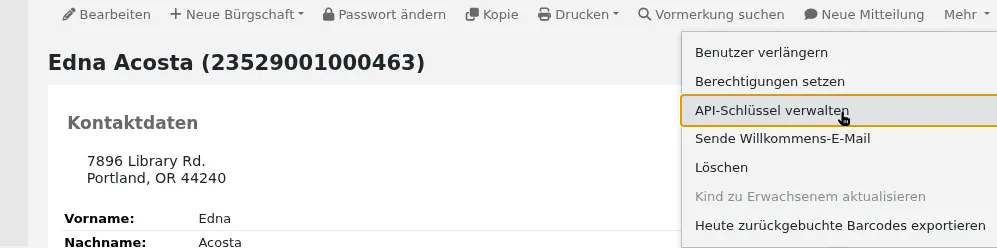
Rufen Sie einen Benutzerdatensatz auf und wählen Sie Mehr > API-Keys verwalten
Wenn für eine*n Benutzer*in noch kein API-Key angelegt wurde, wird ein entsprechender Hinweis angezeigt
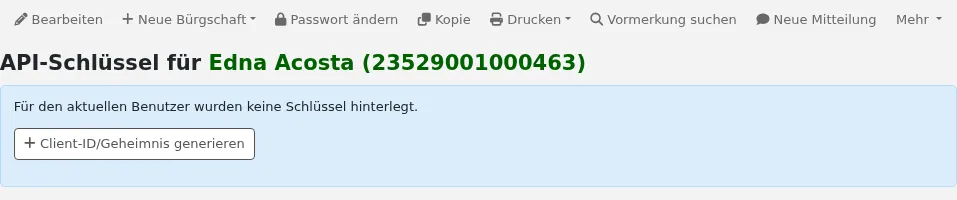
Geben Sie eine Beschreibung für das Paar aus Client ID/Secret an und klicken Sie auf Speichern

Koha generiert ein Paar aus Client ID/Secret, das dazu verwendet werden kann, Koha mit anderen Anwendungen als authentifizierter Anwender zu verbinden
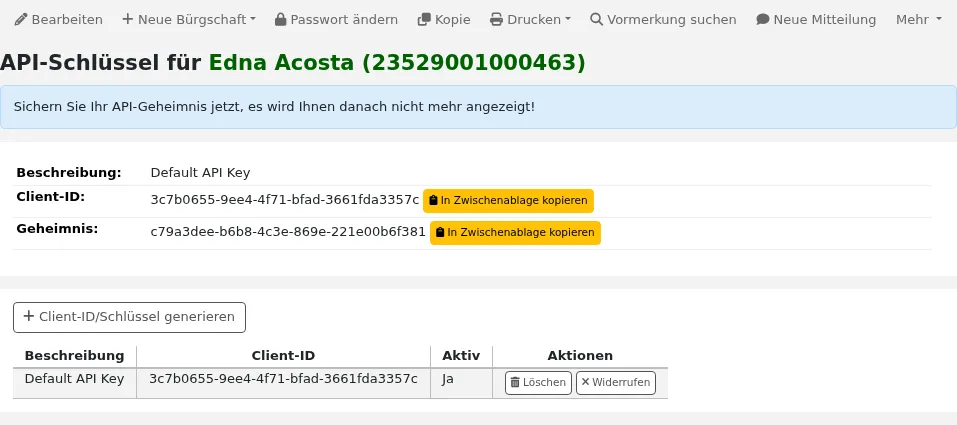
Klicken Sie auf die Schaltfläche „Widerrufen“ neben einem API-Key-Paar, um dieses zu deaktivieren bis es reaktiviert wird
Barcodebild-Generator
Koha provides a barcode image generator on both the staff interface and the OPAC. Both require a user to be logged in to use the service, to prevent abuse by third parties.
For example:
https://opac.example.org/cgi-bin/koha/svc/barcode?barcode=123456789&type=UPCE
or
https://staff-interface.example.org/cgi-bin/koha/svc/barcode?barcode=123456789&type=UPCE
Die obenstehende URL generiert ein Barcodebild für den Barcode „123456789“ im UPCE-Barcodeformat.
Die verfügbaren Barcodeformate sind: * Code39 * UPCE * UPCA * QRcode * NW7 * Matrix2of5 * ITF * Industrial2of5 * IATA2of5 * EAN8 * EAN13 * COOP2of5
Wenn kein Typ angegeben wird, wird Code39 verwendet.
In der Voreinstellung enthält das Barcodebild auch den Barcode als Text. Wenn dies nicht gewünscht wird, kann der Parameter „notext“ verwendet werden, um dies zu unterdrücken.
For example:
https://opac.example.org/cgi-bin/koha/svc/barcode?barcode=123456789¬ext=1
or
https://staff-interface.example.org/cgi-bin/koha/svc/barcode?barcode=123456789¬ext=1
generiert ein Barcodebild für 123456789 ohne den Text „123456789“ darunter.
This service can be used to embed barcode images into slips and notices printed from the browser, and to embed a patron card number into the OPAC, among other possibilities.