Interlibrary loans
Get there: More > Administration > System preferences > Interlibrary loans
Features
CirculateILL
Asks: ___ the circulation of ILL requested items.
Default: Disable
Values:
Disable
Enable
Description:
This system preference controls whether you have the option to checkout ILL items directly from an ILL request. More details can be found in the Circulating ILL materials section.
ILLModule
Asks: ___ the interlibrary loans module (master switch).
Default: Disable
Values:
Disable
Enable
Description:
This preference is used to enable Koha’s ILL module which is used to manage ILL requests.
ILLModuleCopyrightClearance
Attention
This system preference is deprecated as of version 24.05 of Koha. It is now an HTML customization location.
Asks: Adding text will enable the copyright clearance stage in request creation. The text you enter will be the text displayed.
Description:
This system preference is used to turn on the copyright clearance step when creating an ILL request from the OPAC. Patrons will need to accept the copyright clearance before they can proceed.
The text entered here is the text they will need to agree to.
ILLModuleUnmediated
Asks: ___ unmediated interlibrary loan requests. If enabled and the ILL backend supports it, the newly created requests are immediately requested by backend.
Default: Disable
Values:
Disable
Enable
Description:
When enabled, this system preference allows ILL requests placed by patrons on the OPAC to be directly sent to ILL suppliers without mediation by library staff.
If this system preference is disabled, staff members will need to manage all ILL requests.
Warning
Not all ILL backends can support this feature.
ILLPartnerCode
Asks: Use patrons from category ___ as partners to place ILL requests with.
Values: list of existing patron categories
Description:
When using interlibrary loans, you can send requests to partners, which should be ‘patrons’ in your system. This system preference is used to determine which patron category these partners are assigned.
ILLRequestsTabs
Version
This feature was first introduced in version 25.05 of Koha.
Asks: Add customizable tabs to interlibrary loan requests list.
Default: [Empty]
Description:
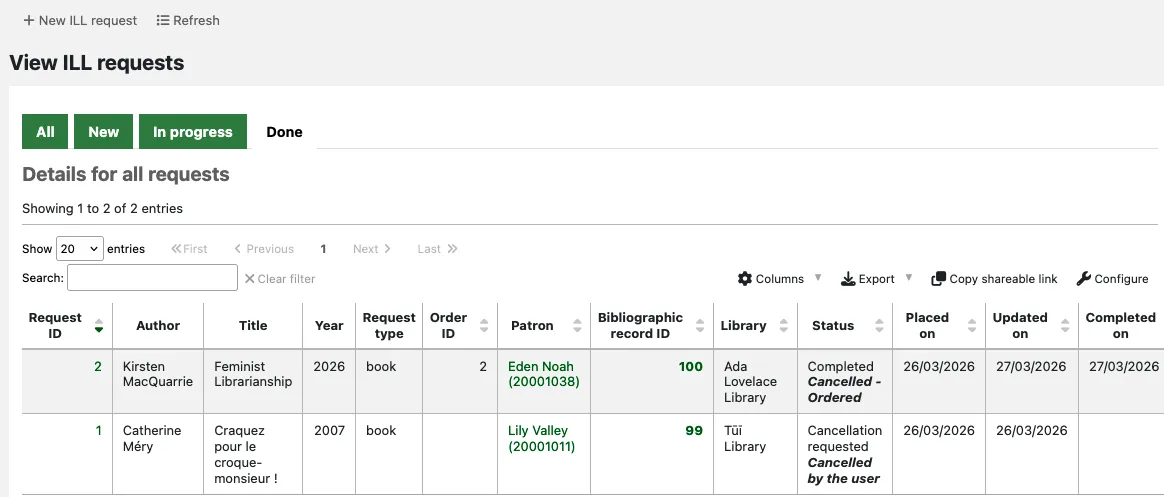
This system preference allows you to organise ILL requests into custom tabs on the main ILL requests screen.
The tabs are based on the main status (not the status alias) of each ILL request. For each tab, specify a tab name and which status codes should be sorted in it.
Use the list of request statuses to find the relevant status codes.
Example:
- name: New
status:
   - NEW
- name: In progress
status:
   - REQ
   - GENREQ
   - REQREV
- name: Done
status:
   - COMP
   - CANCREQ
   - CHK
   - RET
The new requests will appear in the ‘New’ tab. Requests with the status Requested, Requested from partners or Request reverted will appear in the ‘In progress’ tab. Requests with the status Completed, Cancellation requested, Checked out or Returned to library will be sorted into the ‘Done’ tab.
Notifications
ILLDefaultStaffEmail
Asks: Fallback email address for staff ILL notices to be sent to in the absence of a library address: ___ .
Description:
By default, replies to ILL request emails will go to the library’s ILL staff email address. If the library’s ILL staff email field is empty, the address entered here will be used.
ILLSendStaffNotices
Asks: Send these ILL notices to staff when appropriate: ___
Description:
You can configure which ILL notices should be sent to staff. More details can be found in the ILL email notifications section.
Enter the letter codes for the notifications to be sent, separated by pipes (|). For example:
ILL_REQUEST_CANCEL|ILL_REQUEST_MODIFIED
If this system preference is left empty, no staff ILL notices will be sent.
OPAC
ILLOpacbackends
Asks: Enabled ILL backends for OPAC initiated requests: ___ .
Description:
This preference controls which ILL backend request forms are available for OPAC requests.
Enter the backend codes, separated by pipes (|). For example:
FreeForm|BLDSS
Refer to the backend configuration guidance for the correct terminology to enter here.
If this system preference is left empty, all installed backends will be enabled for OPAC requests.
ILLOpacUnauthenticatedRequest
Version
This feature was first introduced in version 25.05 of Koha.
Asks: ___ OPAC users to place ILL requests without having to be logged in.
Values:
Don’t allow
Allow
Default: Don’t allow
Description:
This system preference controls whether patrons can place interlibrary loan requests in the OPAC when they are not logged in.
When this preference is set to ‘Allow’, patrons who do not yet have a library account or those who have forgotten their login details can still place ILL requests.
This is especially useful when patrons are redirected from another catalogue or website to place an ILL request in your OPAC. It allows them to place their request straightaway, without worrying about whether they are already a library member or not.
When an unauthenticated ILL request is created, it has the status ‘Unauthenticated’. Library staff will be able to link it to a new or existing patron account when managing the request; the status then changes to ‘New request’.
Workflow
AutoILLBackendPriority
Version
This feature was first introduced in version 25.05 of Koha.
Asks: Select which backends will be queried for availability and in what order of priority. The first available backend will be suggested to place the request with.
Description:
This system preference enables you to check which provider(s) would be able to supply the requested title, before deciding which one you want to place the request with.
To be able to use this feature, you need to have at least one additional backend installed (any backend other than Standard).
If no backend is selected in this system preference, the feature will be disabled.
If you have more than one additional backend installed, you can drag and drop the labels to place the backends in your preferred order of priority.

If you are using this feature (you have selected at least one backend in this system preference), patrons will not be prompted to select a provider when placing an interlibrary loan request in the OPAC. Instead, Koha will check the backends for availability in the background and automatically assign one to the request.
Unless you have enabled the ILLModuleUnmediated system preference, the created requested has the status ‘New request’ and requires staff to progress it.
If you are using this feature, you will not see an option to initially select a backend when clicking ‘New ILL request’ in the staff interface. Instead, when clicking ‘Create’ after entering the request metadata, you will see the ‘Confirm request’ page where the availability check occurs. Using the information displayed, you can decide which provider to send the request to.
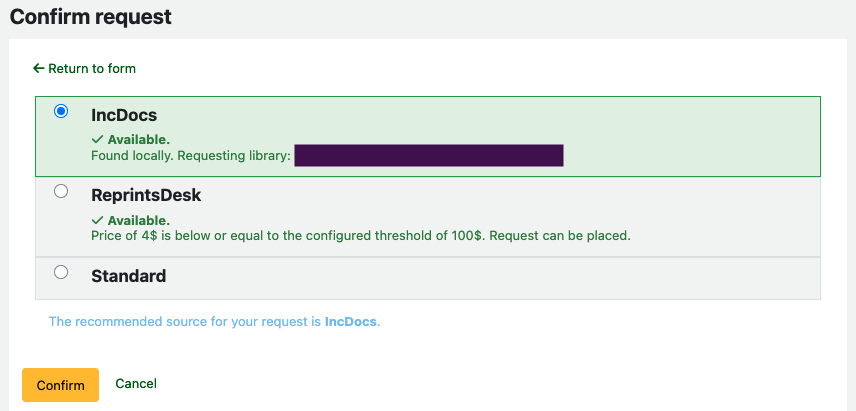
Because the backend selection is done after the request metadata is provided, the form from the Standard backend is used to enter the details of the requested title.
ILLCheckAvailability
Asks: ___ external sources for availability during the request process.
Default: Don’t check
Values:
Don’t check
Check
Description:
This preference controls whether specific external resources will be searched prior to a request being placed. The resources available are installed using plugins. These can be located on the Koha plugins wiki page at https://wiki.koha-community.org/wiki/Koha_plugins. Currently there are plugins for EDS (EBSCO Discovery Service), Z39.50 and Unpaywall. When a patron submits an ILL request, the item metadata in the form is used to search the external resource. The patron can then click on the title links in the displayed results. If they find the item they were requesting the request can be abandoned. If not, the patron can continue with the request in the normal way.
ILLModuleDisclaimerByType
Asks: If the ILL backend supports it, adding YAML will enable the request type disclaimer stage in request creation, prompting the user with a request type specific disclaimer as defined (staff interface and OPAC).
Description:
This system preference is used to provide different disclaimers for different request types.
For each request type, there are 3 configuration options:
text: the HTML that will be visible for the specified request type.av_category_code: the authorized value category that will be used for the options being presented at the disclaimer stage.bypass: allows for a specific request type to skip the disclaimer stage.
Example:
all:
 text: |
  <h2>HTML title</h2>
  <p>This is an HTML paragraph</p>
  <p>This is another HTML paragraph</p>
 av_category_code: YES_NO
article:
 text: copyright text for all article type requests
 av_category_code: YES_NO
 bypass: 1
The example will show the first text (“HTML title, etc.”) with a yes/no choice for all requests except for article requests, which will skip the disclaimer step.
Note
This is not available to all backends.
Warning
This system preference requires YAML syntax to work properly.
This means
Make sure there is NO space between the configuration name and the colon
Make sure there IS a space between the colon and the value
Make sure each configuration is on its own line