Web services
Koha provides a number of APIs allowing access to its data and functions.
OAI-PMH
Per il Protocollo OAI-PMH (Open Archives Initiative-Protocol for Metadata Harvesting) ci sono due gruppi di “partecipanti”: fornitori di dati e fornitori di servizi. I fornitori di dati (archivi aperti, repositori) danno libero accesso ai metadati, e possono offrire a loro discrezione accesso libero al full-text o ad altre risorse. OAI-PMH offre una soluzione semplice ai fornitori di dati. I fornitori di servizi usano le interfacce OAI dei fornitori di dati per raccogliere e conservare metadati. Questo implica che non saranno effettuate ricerche dall’utenza verso i fornitori di dati; se mai, i servizi sono basati sui dati raccolti via OAI-PMH.
Learn more about OAI-PMH at https://www.openarchives.org/pmh/
Koha can act as both Data Provider and Service Provider. This section documents its use as Data Provider. For information on using it as a Service Provider, see the OAI repositories section.
To enable OAI-PMH in Koha edit the OAI-PMH preference.
Once enabled you can visit https://opac.example.org/cgi-bin/koha/oai.pl to
see your file.
Per default, Koha non include informazioni di copia nei set di OAI-PMH, ma si possono aggiungere usando l’opzione include_items nel file di configurazione indicato in OAI-PMH:ConfFile.
Note that the sample conf file below contains entries for both marc21 and marcxml. The metadata prefix marc21 is the one recommended by the OAI-PMH guidelines <https://www.openarchives.org/OAI/2.0/guidelines-marcxml.htm>. The prefix marcxml is supported, but it is only included for backwards compatibility with older systems. The metadata prefix oai_dc is mandated by the standard as a fallback.
Esempio di configurazione OAI
format:
  vs:
    metadataPrefix: vs
    metadataNamespace: http://veryspecial.tamil.fr/vs/format-pivot/1.1/vs
    schema: http://veryspecial.tamil.fr/vs/format-pivot/1.1/vs.xsd
    xsl_file: /usr/local/koha/xslt/vs.xsl
  marc21:
     metadataPrefix: marc21
     metadataNamespace: https://www.loc.gov/MARC21/slim https://www.loc.gov/standards/marcxml/schema/MARC21slim
     schema: https://www.loc.gov/MARC21/slim https://www.loc.gov/standards/marcxml/schema/MARC21slim.xsd
     include_items: 1
  marcxml:
     metadataPrefix: marcxml
     metadataNamespace: https://www.loc.gov/MARC21/slim https://www.loc.gov/standards/marcxml/schema/MARC21slim
     schema: https://www.loc.gov/MARC21/slim https://www.loc.gov/standards/marcxml/schema/MARC21slim.xsd
     include_items: 1
  oai_dc:
     metadataPrefix: oai_dc
     metadataNamespace: https://www.openarchives.org/OAI/2.0/oai_dc/
     schema: https://www.openarchives.org/OAI/2.0/oai_dc.xsd
     xsl_file: /usr/local/koha/koha-tmpl/intranet-tmpl/xslt/UNIMARCslim2OAIDC.xsl
Le opzioni sono:
xsl_file: Percorso di un file XSLT che sarà usato per trasformare i dati Koha MARCXML nella struttura/formato necessari. Può essere utile, ad esempio, se si desidera generare alcuni campi Dublin Core specifici invece di quelli predefiniti.
include_items: Se impostato a 1, le informazioni sulle copie saranno incluse nella risposta secondo la mappatura del framework MARC.
expanded_avs: Se impostato su 1, tutti i valori codificati saranno espansi con le descrizioni. Ciò include i nomi delle biblioteche, le descrizioni dei tipi di elementi, le descrizioni dei valori autorizzati e le descrizioni delle fonti di classificazione.
Tutte queste opzioni possono essere utilizzate con diverse voci di metadataPrefix, consentendo agli utenti di richiedere l’una o l’altra.
Server SRU
Koha implements the Search/Retrieve via URL (SRU) protocol. More information about the protocol itself can be found at https://www.loc.gov/standards/sru/. The version implemented is version 1.1.
Explain
Se vuoi avere informazioni sulla specifica implementazione SRU di un dato server, puoi accedere al file Explain facendo una richiesta al server senza alcun parametro. Tipo http://myserver.com:9999/biblios/. Il responso del server è un file XML che sarà simile a quello qui seguente e ti fornirà le informazioni sulla configurazione di default dello specifico server.
       <zs:explainResponse>
            <zs:version>1.1</zs:version>
            <zs:record>
                 <zs:recordSchema>http://explain.z3950.org/dtd/2.0/</zs:recordSchema>
                 <zs:recordPacking>xml</zs:recordPacking>
                 <zs:recordData>
                 <explain xml:base="zebradb/explain-biblios.xml">
                 <!--
                 try stylesheet url: http://./?stylesheet=docpath/sru2.xsl
                 -->
            <serverInfo protocol="SRW/SRU/Z39.50">
                 <host>biblibre</host>
                 <port>9999</port>
                 <database>biblios</database>
            </serverInfo>
            <databaseInfo>
                 <title lang="en" primary="true">Koha 3 Bibliographic SRU/SRW/Z39.50 server</title>
                 <description lang="en" primary="true">Koha 3 Bibliographic Server</description>
                 <links>
                      <sru>http://biblibre:9999</sru>
                 </links>
            </databaseInfo>
            <indexInfo>
                 <set name="cql" identifier="info:srw/cql-context-set/1/cql-v1.1">
                      <title>CQL Standard Set</title>
                 </set>
                 <index search="true" scan="true" sort="false">
                 <title lang="en">CQL Server Choice</title>
                 <map>
                      <name set="cql">serverChoice</name>
                 </map>
            <map>
               <attr type="1" set="bib1">text</attr>
               </map>
          </index>
      <index search="true" scan="true" sort="false">
         <title lang="en">CQL All</title>
             <map>
<name set="cql">all</name>
</map>
<map>
<attr type="1" set="bib1">text</attr>
</map>
</index>
<!-- Record ID index -->
<index search="true" scan="true" sort="false">
<title lang="en">Record ID</title>
<map>
<name set="rec">id</name>
</map>
<map>
<attr type="1" set="bib1">rec:id</attr>
<attr type="4" set="bib1">3</attr>
</map>
</index>
Cerca
Questo url : http://myserver.com:9999/biblios?version=1.1&operation=searchRetrieve&query=reefs è composto dai seguenti elementi:
base url del server SRU: http://myserver.com:9999/biblios?
la parte di ricerca con 3 parametri obbligatori: version, operation e query. I parametri della parte di ricerca devono avere la forma chiave=valore, e possono essere combinati con il carattere &.
Si possono aggiungere altri parametri alla query, per esempio maximumRecords indica il massimo numero di record da ricevere in risposta dal server. Per cui http://myserver.com:9999/biblios?version=1.1&operation=searchRetrieve&query=reefs&maximumRecords=5 restituirà i primi 5 record trovati.
La chiave «operation» può avere due valori: scan o searchRetrieve.
Se operation=searchRetrieve, allora la chiave di ricerca deve essere query. Esempio: operation=searchRetrieve&query=reefs
Se operation=scan, allora la chiave di ricerca deve essere scanClause. Esempio : operation=scan&scanClause=reefs
etc/zebradb/biblios/etc/bib1.att definisce gli indici Zebra/3950 che esistono nel tuo sistema. Per esempio vedrai che ci sono gli indici per Soggetti e Titoli: att 21 Subject e att 4 Title rispettivamente.
Nel file etc/zebradb/pqf.properties si vede che un access point usa già l’indice Subject (index.dc.subject = 1=21) mentre un altro usa l’indice Title (index.dc.title = 1=4) So che questo è il mio indice Subject perché come si vede nel file bib1.att, è richiamato con =1=21 in Z3950: così index.dc.subject = 1=21 punta all’indice Subject. E Title è richiamato con 1=4 così index.dc.title = 1=4 punta all’indice Title.Posso così costruire una query come nella casella di ricerca, semplicemente facendola precedere dalla chiave «query»: query=Subject=reefs and Title=coral cerca «reefs» tra i soggetti e «coral» tra i titoli. L’url completo sarà http://myserver.com:9999/biblios?version=1.1&operation=searchRetrieve&query=Subject=reefs and Title=coral Se voglio limitare i risultati a 5 records, l’url sarà http://myserver.com:9999/biblios?version=1.1&operation=searchRetrieve&query=Subject=reefs and Title=coral&maximumRecords=5
Si possono fare prove con troncamenti, relazioni, ecc. Sono definiti anch’essi in pqf.properties. Per esempio le proprietà position sono definite come:
 position.first              = 3=1 6=1
# "first in field"
 position.any                = 3=3 6=1
   # "any position in field"
Se per esempio cerco «coral» all’inizio di un titolo, la query sarà : http://myserver.com:9999/biblios?version=1.1&operation=searchRetrieve&query=Title=coral first
Retrieve
La ricerca http://univ_lyon3.biblibre.com:9999/biblios?version=1.1&operation=searchRetrieve&query=coral reefs&maximumRecords=1 restituisce un solo record. La risposta è del tipo:
          <zs:searchRetrieveResponse>
<zs:version>1.1</zs:version>
<zs:numberOfRecords>1</zs:numberOfRecords>
<zs:records>
<zs:record>
<zs:recordPacking>xml</zs:recordPacking>
<zs:recordData>
<record xsi:schemaLocation="http://www.loc.gov/MARC21/slim http://www.loc.gov/ standards/marcxml/schema/MARC21slim.xsd">
<leader> cam a22 4500</leader>
<datafield tag="010" ind1=" " ind2=" ">
<subfield code="a">2-603-01193-6</subfield>
<subfield code="b">rel.</subfield>
<subfield code="d">159 F</subfield>
</datafield>
<datafield tag="020" ind1=" " ind2=" ">
<subfield code="a">FR</subfield>
<subfield code="b">00065351</subfield>
</datafield>
<datafield tag="101" ind1="1" ind2=" ">
<subfield code="c">ita</subfield>
</datafield>
<datafield tag="105" ind1=" " ind2=" ">
<subfield code="a">a z 00|y|</subfield>
</datafield>
<datafield tag="106" ind1=" " ind2=" ">
<subfield code="a">r</subfield>
</datafield>
<datafield tag="100" ind1=" " ind2=" ">
<subfield code="a">20091130 frey50 </subfield>
</datafield>
<datafield tag="200" ind1="1" ind2=" ">
<subfield code="a">Guide des récifs coralliens / A Guide to Coral Reefs</subfield>
<subfield code="b">Texte imprimé</subfield>
<subfield code="e">la faune sous-marine des coraux</subfield>
<subfield code="f">A. et A. Ferrari</subfield>
</datafield>
<datafield tag="210" ind1=" " ind2=" ">
<subfield code="a">Lausanne</subfield>
<subfield code="a">Paris</subfield>
<subfield code="c">Delachaux et Niestlé</subfield>
<subfield code="d">cop. 2000</subfield>
<subfield code="e">impr. en Espagne</subfield>
</datafield>
<datafield tag="215" ind1=" " ind2=" ">
<subfield code="a">287 p.</subfield>
<subfield code="c">ill. en coul., couv. ill. en coul.</subfield>
<subfield code="d">20 cm</subfield>
</datafield>
......
<idzebra>
<size>4725</size>
<localnumber>2</localnumber>
<filename>/tmp/nw10BJv9Pk/upd_biblio/exported_records</filename>
</idzebra>
</record>
</zs:recordData>
<zs:recordPosition>1</zs:recordPosition>
</zs:record>
</zs:records>
</zs:searchRetrieveResponse>
ILS-DI
As of writing, the self documenting ILS-DI is the most complete interface. After it has been enabled as described in the
ILS-DI system preferences
section, the documentation should be available at
https://opac.example.org/cgi-bin/koha/ilsdi.pl
JSON reports services
Koha ha un JSON reports service per i report salvati usando le funzionalità Guided reports wizard o Report from SQL.
Per default i reports non sono pubblici e sono accessibili solo ad utenti autenticati. Se un report è messo esplicitamente a pubblico, allora sarà accessibile senza autenticazione da chiunque. Questa feature deve essere usata solo per condividere dati che non contengono informazioni sugli utenti.
I report possono essere acceduti usando i seguenti URLs:
Public reports:
https://opac.example.org/cgi-bin/koha/svc/report?id=REPORTIDNon-public reports:
https://staff-interface.example.org/cgi-bin/koha/svc/report?id=REPORTID
Sono disponibili anche alcuni parametri:
Instead of accessing the report by REPORTID you can also use the report’s name:
https://opac.example.org/cgi-bin/koha/svc/report?name=REPORTNAMEorhttps://staff-interface.example.org/cgi-bin/koha/svc/report?name=REPORTNAMEFor easier development there is also an option to generate an annotated output of the data. It will generate an array of hashes that include the field names as keys:
https://opac.example.org/cgi-bin/koha/svc/report?name=REPORTNAME&annotated=1orhttps://staff-interface.example.org/cgi-bin/koha/svc/report?name=REPORTNAME&annotated=1
Versioned RESTful API Effort
There is an ongoing effort to converge the APIs above into a single versioned
set of modern RESTful endpoints documented using the OpenAPI standard and
available by default under https://opac.example.org/api/v1/
La documentazione completa di queste API per la propria versione di Koha si trova su api.koha-community.org.
OAuth2 client credentials grant
Koha supports the OAuth2 client credentials grant as a means to secure the API for using it from other systems to adhere to current industry standards. More information on the OAuth2 client credentials grant standard can be found here.
Interfaccia per la gestione dall” API key per gli utenti
In order for API keys to be create for patrons, the system preference RESTOAuth2ClientCredentials must be enabled for the option to appear in a patron record.
Vai a un record utente e scegli Più > Gestione API keys
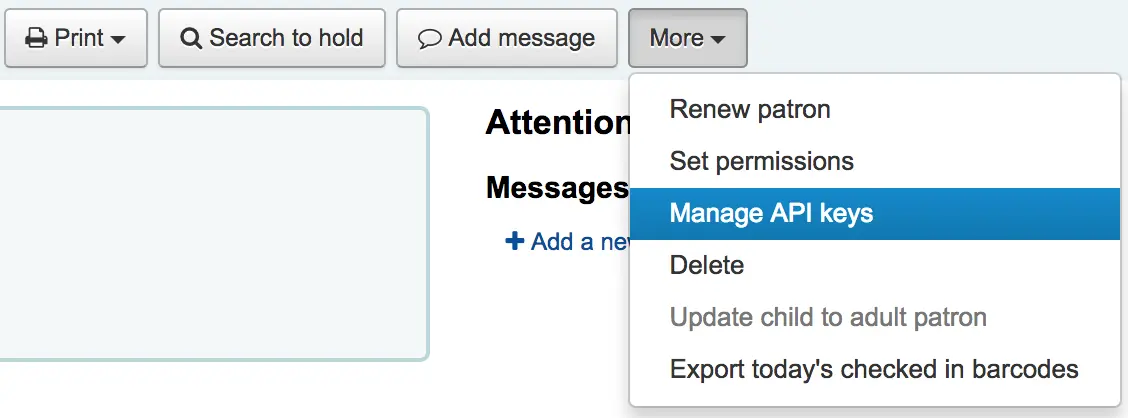
Se non c’è una API key per un utente, un messaggio avviserà di creare una coppia client id/secret.

Indica una descrizione per la coppia client id/secret e salva
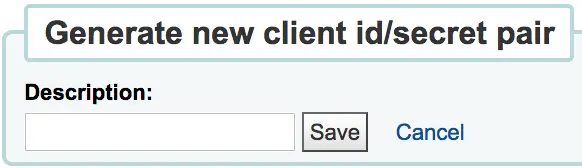
Koha genererà una coppia client id/secret da usare per connessioni con autenticazione da sistemi di terze parti a Koha

Cliccando sul bottone Revoca posto accanto a una coppia di credenziali di un’API, disattiverà quella credenziale fino ad operazione contraria
Generatore barcode (immagine)
Koha provides a barcode image generator on both the staff interface and the OPAC. Both require a user to be logged in to use the service, to prevent abuse by third parties.
For example:
https://opac.example.org/cgi-bin/koha/svc/barcode?barcode=123456789&type=UPCE
or
https://staff-interface.example.org/cgi-bin/koha/svc/barcode?barcode=123456789&type=UPCE
L’URL qui sopra genererà un’immagine con codici barre usando il valore «123456789» e il formato di barcode UPCE.
I tipi di formato disponibli sono: * Code39 * UPCE * UPCA * QRcode * NW7 * Matrix2of5 * ITF * Industrial2of5 * IATA2of5 * EAN8 * EAN13 * COOP2of5
Se non viene specificato viene usato il tipo Code39.
Di default l’immagine conterrà anche il valore testuale del barcode. Se si desidera toglierlo, basterà passare il parametro “notext” per sopprimere il valore testuale.
For example:
https://opac.example.org/cgi-bin/koha/svc/barcode?barcode=123456789¬ext=1
or
https://staff-interface.example.org/cgi-bin/koha/svc/barcode?barcode=123456789¬ext=1
genererà un’immagine con codice a barre il cui valore sarà 123456789 e non avrà il testo “123456789” sotto i codici a barre.
This service can be used to embed barcode images into slips and notices printed from the browser, and to embed a patron card number into the OPAC, among other possibilities.